Free tool · Bookings
Paste one snippet and your own website shows your live availability — visitors see the dates you're free and click through to book you on GigXchange. Two layouts, dark or light, always current. Free with every profile.
Updated 16 November 2026
GIGXCHANGE The Booking Manager is a free embed that shows a UK musician's live GigXchange availability on their own website. Copy the snippet from the app and paste it into WordPress, Squarespace, Wix or any site: it is a standard iframe up to 420px wide that shrinks to fit. Pick the full monthly calendar for a booking page or the compact strip for under a bio, in dark or light. It is live, not a screenshot: marking a date taken in the app updates every copy at once, and any GigXchange booking blocks its date automatically. A click on a date or Book now opens your profile, where visitors message and book you direct.
The worked example below is a capture of the live widget in both layouts, annotated.
| 04Walk the widgetThe real app, screen by screen | |
| 05How it worksThe steps, start to finish | |
| 06Worked exampleThe widget, annotated | |
| 07Everything in the widgetEverything the tool does | |
| 09Why “DM for dates” is costing you bookingsThe background, in plain English | |
| 10Artists already on GigXchangeReal artists already on GigXchange | |
| 11More free tools for artistsThe other free tools | |
| 12Frequently asked questionsLayouts, updates, booking |
The widget, live
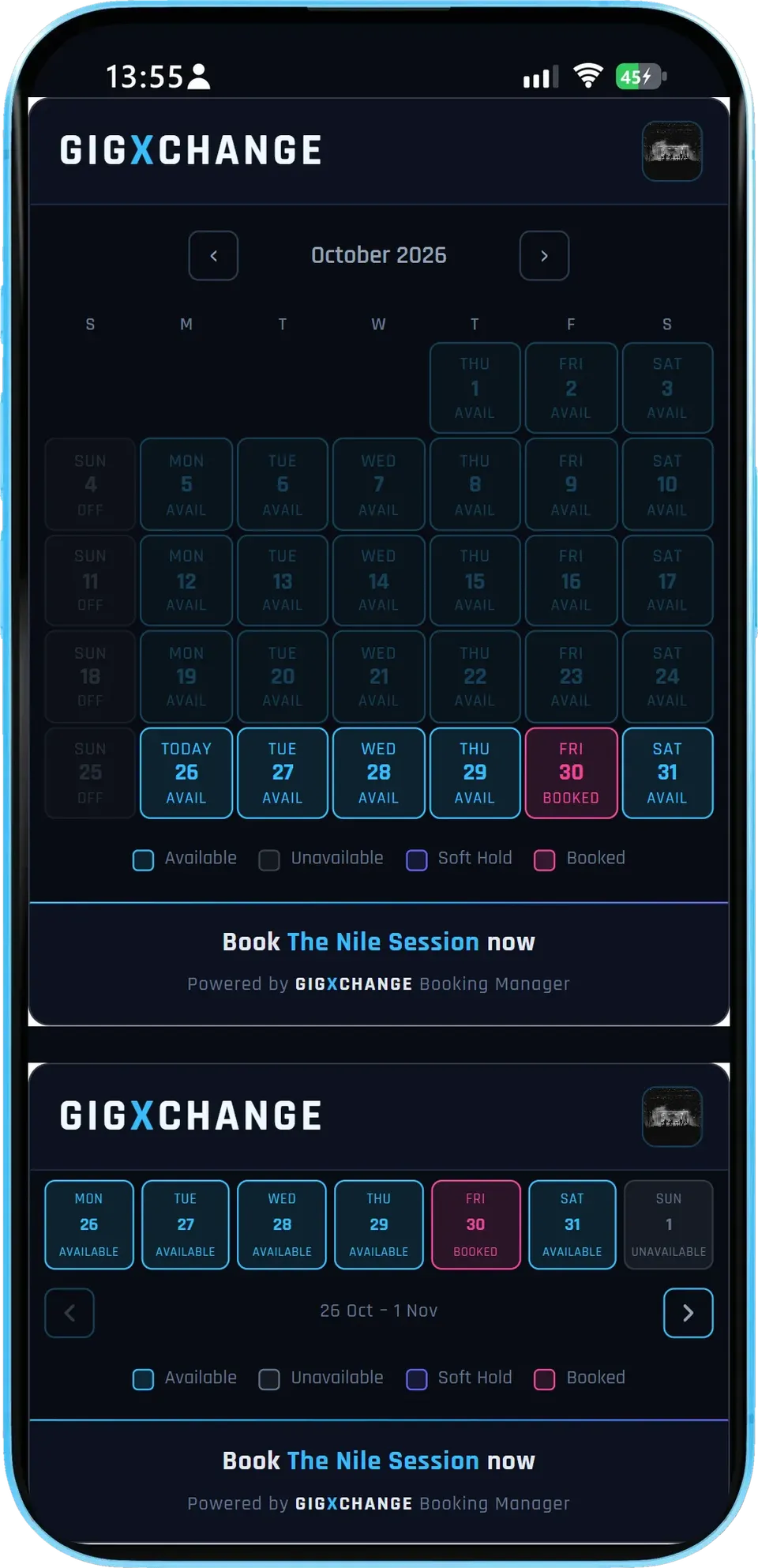
This is a real GigXchange act’s availability, exactly as it appears on their own website: the full calendar for a dedicated booking page and the compact strip for a home page, both live, not screenshots.
- Is it my real availability?
- Yes. It reads the calendar you keep in GigXchange, so a date you mark taken, or one booked through GigXchange, shows as taken on every copy of the widget at once.
- Which websites can it go on?
- Any site that accepts an iframe: WordPress, Squarespace, Wix, Bandzoogle, Carrd and hand-built pages. It is up to 420 px wide and shrinks to fit a phone.
- Calendar or strip?
- The calendar (about 540 px tall) suits a dedicated booking page; the strip (about 270 px) sits under a bio or in a sidebar. Both come in dark or light.
One snippet, always current. Mark a date in the app and every copy of the widget updates. Sign up free to put yours on your site.
The real Booking Manager in the GigXchange app, step by step: from the free and booked dates you keep in your calendar to the live booking calendar that appears on your own website.
A booker who finds you on your own website wants one answer before anything else: are you free on the night they need? If the answer is "message us to check", many of them move on to the next act. The Booking Manager puts the answer on your site, live, so the enquiry starts with a date that is actually free.
It works from one source: the availability you already keep in GigXchange. Below is the real thing, screen by screen - a jazz trio's calendar in the app, the pattern behind it, the embed window, and the two widgets as a visitor sees them.
- 01 / 05 Your availability
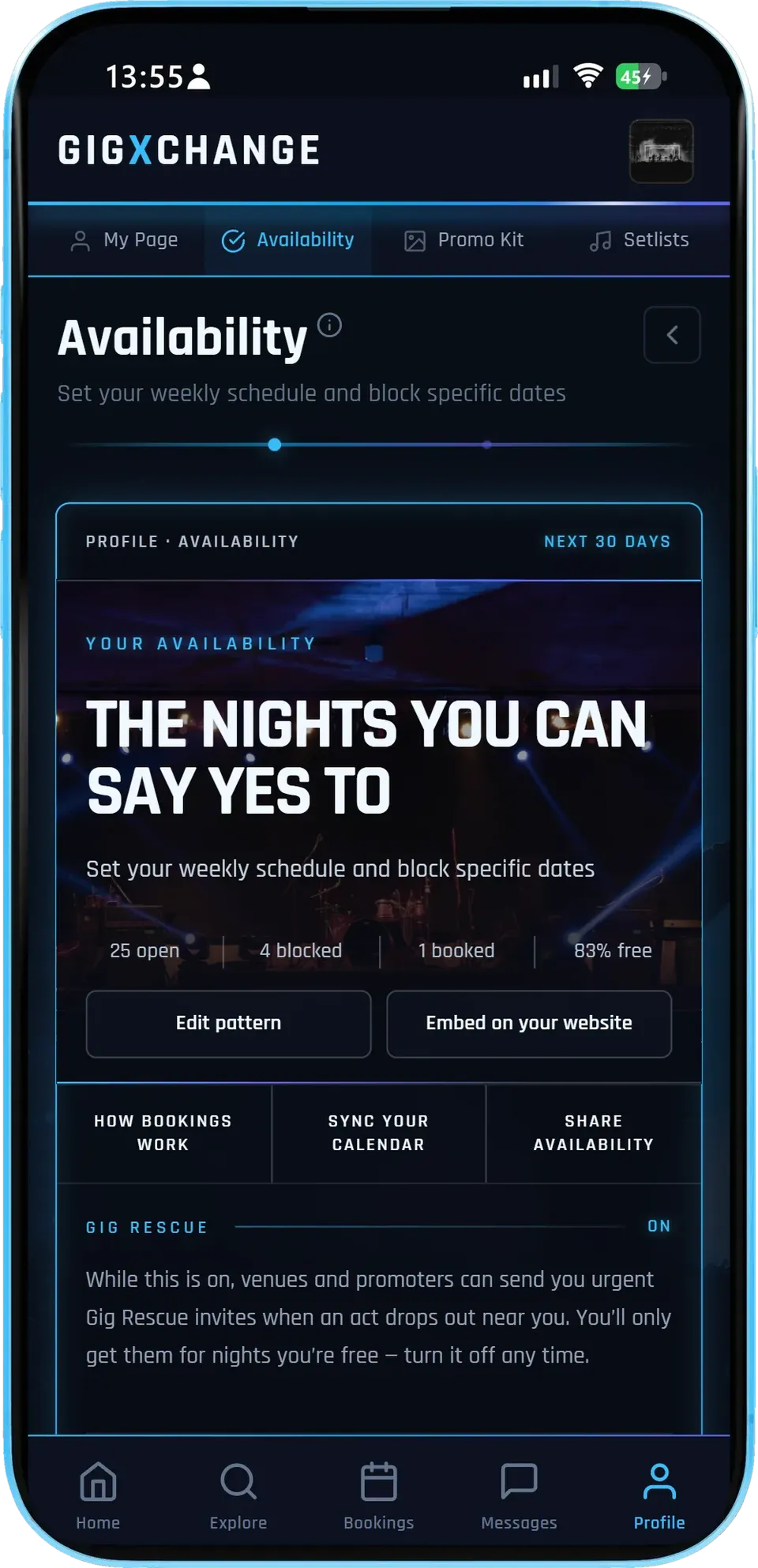
The Availability page in the app: how many nights are open, blocked and booked, with the two actions that matter right under them.
- At a glanceOpen, blocked and booked nights for the next 30 days.
- Edit patternSet the days you usually play once.
- Embed on your websiteGet the widget code from the same page.
This act has 25 open nights, 4 blocked and 1 booked over the next 30 days - 83% free. Gig Rescue is on, so venues and promoters can send them urgent invites for nights they are free.
- 02 / 05 The month
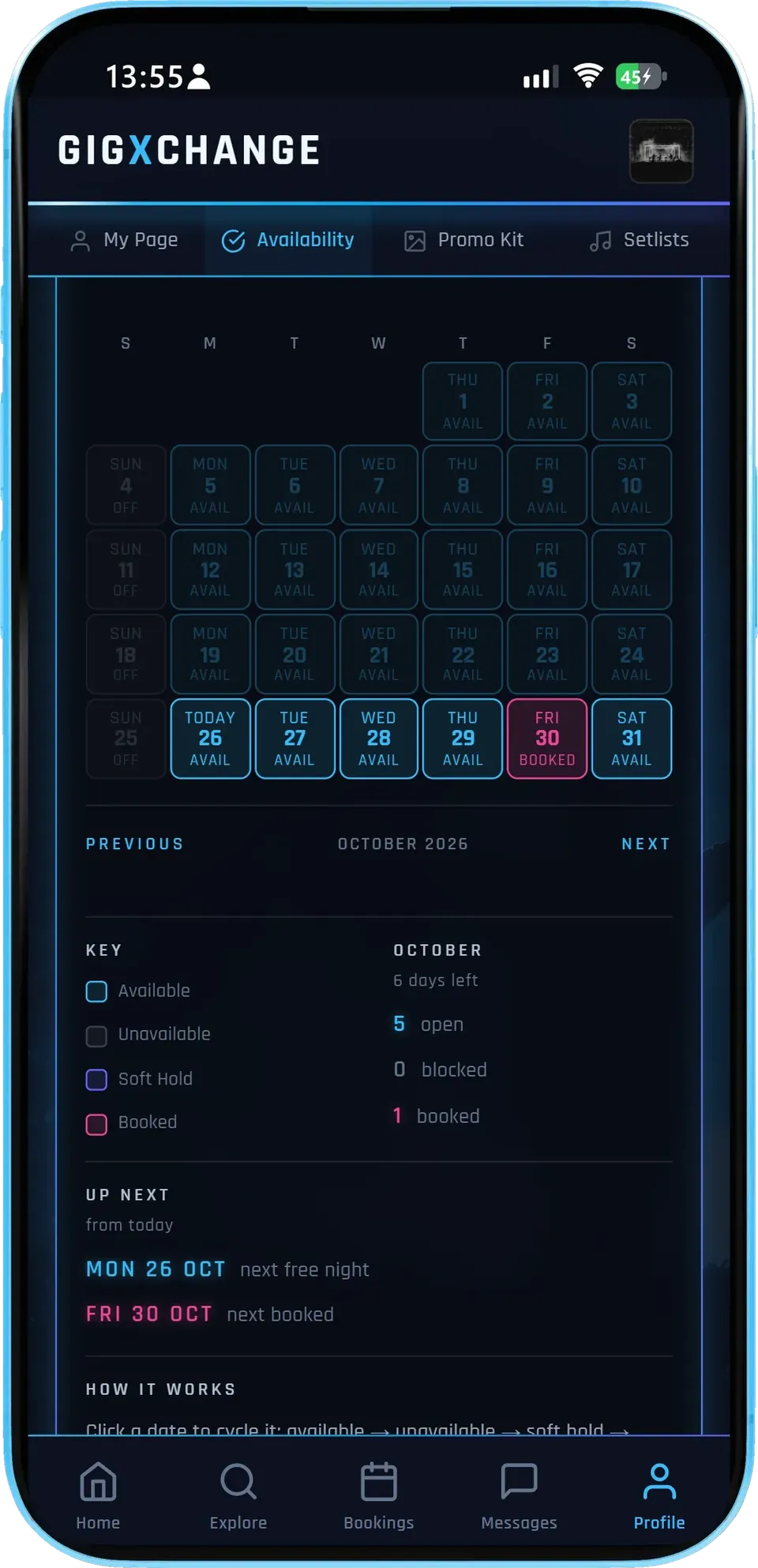
Every day of the month with its state, a key, the month's counts and the next free and next booked night.
- Tap to changeA tap cycles a date: available, unavailable, soft hold.
- Booked is automaticNights booked on GigXchange show as booked by themselves.
- What is nextThe next free night and the next booking, from today.
October has 6 days left: 5 open, 0 blocked and 1 booked. Monday 26 October is the next free night and Friday 30 October is booked.
- 03 / 05 Your pattern
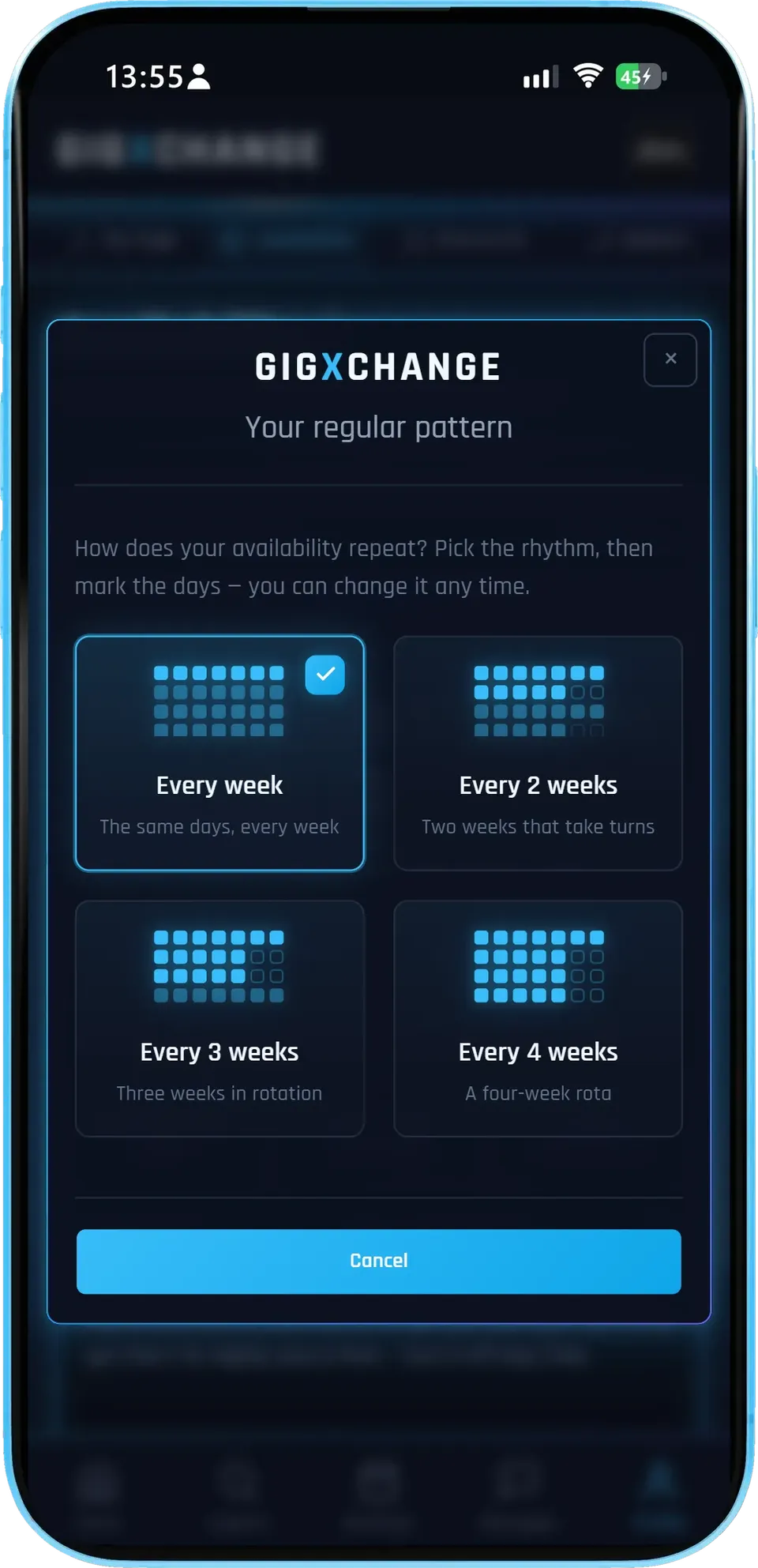
Pick the rhythm your gigging follows, then mark the days - the calendar fills itself in from it.
- Four rhythmsEvery week, or every 2, 3 or 4 weeks.
- Set it onceChange it any time; single dates can still be blocked.
- Nothing to copyThe widget reads the same calendar.
This act repeats every week. A rotation that takes turns - every 2, 3 or 4 weeks - suits players who split their nights between bands or residencies.
- 04 / 05 Embed on your website
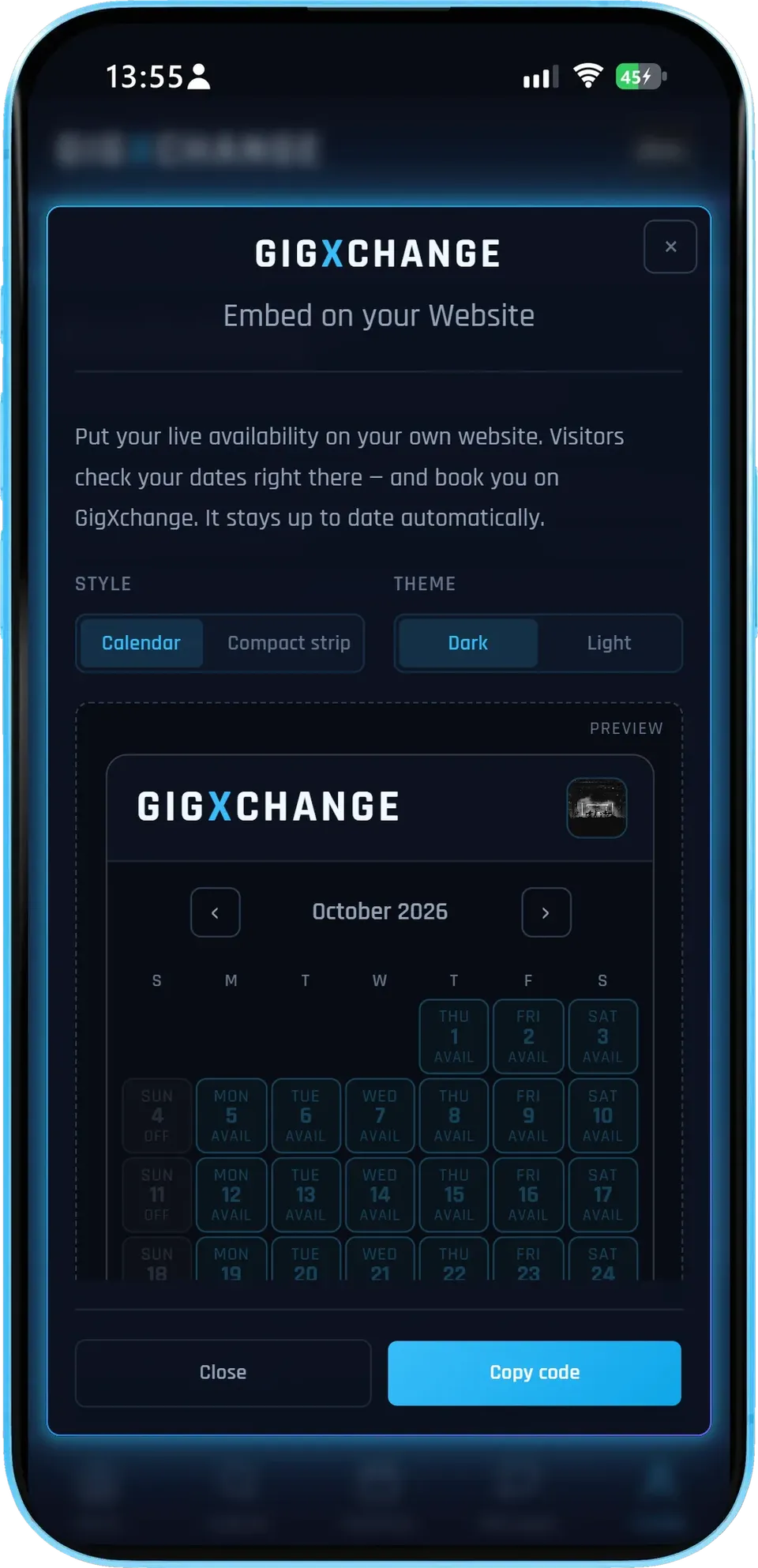
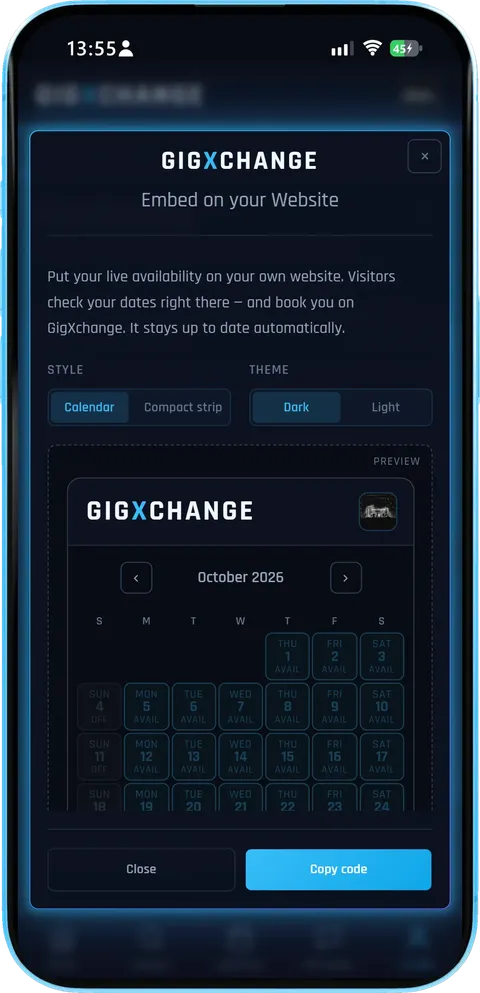
Choose the style and theme, see the live preview, and copy the code for your site.
- Two stylesA full calendar or a compact strip.
- Dark or lightMatch your website's look.
- Live previewWhat you see is the widget your visitors get.
The calendar style in the dark theme, previewing this act's October. Copy code puts the snippet on your clipboard; it stays up to date automatically.
- 05 / 05 On your website
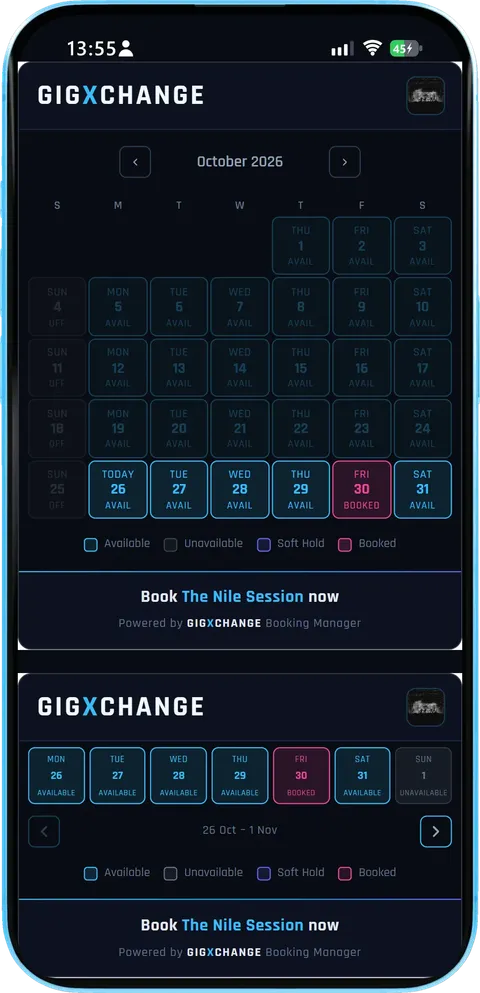
The two widgets as a visitor sees them: the full calendar for a booking page and the strip for a bio or sidebar.
- LiveThe same dates as the app, updated as you change them.
- Book nowA tap takes the visitor to your GigXchange profile to book.
- Fits a phoneUp to 420 px wide and shrinks to fit.
Both widgets show Friday 30 October as booked and Monday to Saturday otherwise free, with a "Book The Nile Session now" link under each.
- 01 / 05
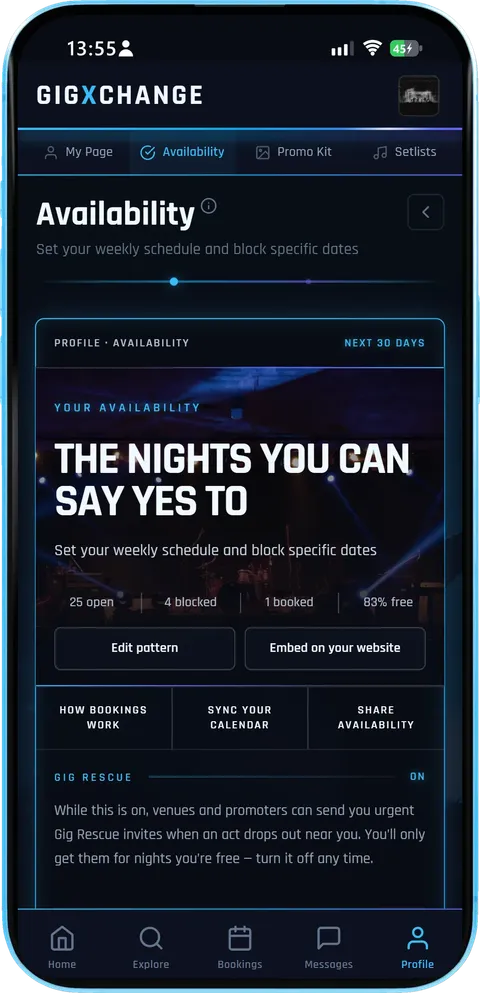 Your availability
The Availability page in the app: how many nights are open, blocked and booked, with the two actions that matter right under them.
- At a glanceOpen, blocked and booked nights for the next 30 days.
- Edit patternSet the days you usually play once.
- Embed on your websiteGet the widget code from the same page.
This act has 25 open nights, 4 blocked and 1 booked over the next 30 days - 83% free. Gig Rescue is on, so venues and promoters can send them urgent invites for nights they are free.
- 02 / 05
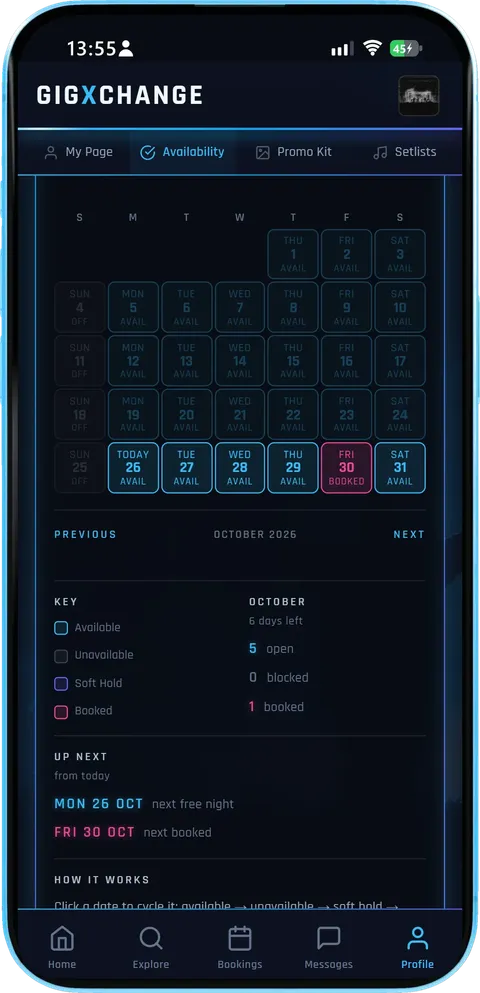 The month
Every day of the month with its state, a key, the month's counts and the next free and next booked night.
- Tap to changeA tap cycles a date: available, unavailable, soft hold.
- Booked is automaticNights booked on GigXchange show as booked by themselves.
- What is nextThe next free night and the next booking, from today.
October has 6 days left: 5 open, 0 blocked and 1 booked. Monday 26 October is the next free night and Friday 30 October is booked.
- 03 / 05
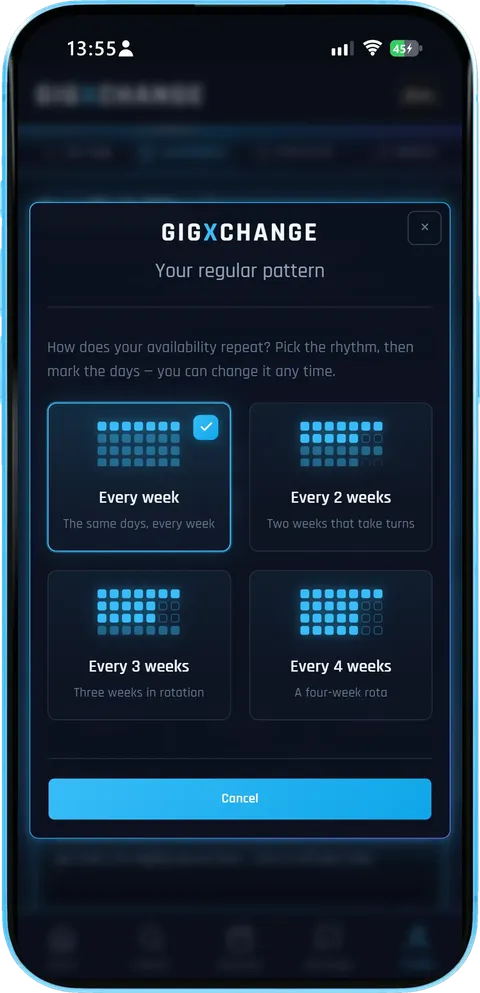 Your pattern
Pick the rhythm your gigging follows, then mark the days - the calendar fills itself in from it.
- Four rhythmsEvery week, or every 2, 3 or 4 weeks.
- Set it onceChange it any time; single dates can still be blocked.
- Nothing to copyThe widget reads the same calendar.
This act repeats every week. A rotation that takes turns - every 2, 3 or 4 weeks - suits players who split their nights between bands or residencies.
- 04 / 05
 Embed on your website
Choose the style and theme, see the live preview, and copy the code for your site.
- Two stylesA full calendar or a compact strip.
- Dark or lightMatch your website's look.
- Live previewWhat you see is the widget your visitors get.
The calendar style in the dark theme, previewing this act's October. Copy code puts the snippet on your clipboard; it stays up to date automatically.
- 05 / 05
 On your website
The two widgets as a visitor sees them: the full calendar for a booking page and the strip for a bio or sidebar.
- LiveThe same dates as the app, updated as you change them.
- Book nowA tap takes the visitor to your GigXchange profile to book.
- Fits a phoneUp to 420 px wide and shrinks to fit.
Both widgets show Friday 30 October as booked and Monday to Saturday otherwise free, with a "Book The Nile Session now" link under each.
The Booking Manager turns availability nobody can see into a self-serve booking funnel in four short steps: keep your calendar, pick a layout, paste one snippet into your website and let visitors book your free dates.
| 01 | Set datesMark when you can playYour availability lives in the same calendar as your GigXchange bookings, and a booking blocks its own date. |
| 02 | Pick a lookLayout and themeFull calendar or compact strip, dark or light — previewed live before you copy anything. |
| 03 | PasteOne snippet, any siteCopy the embed into your website, EPK or blog. No plugins, no code knowledge, up to 420px wide. |
| 04 | Get bookedStraight to your profileVisitors click a date or “Book now” through to your profile, where they message you and book you direct. |
A capture of the live availability widget as visitors to your site see it, annotated: the calendar and the strip, dark and light, and what a click does.
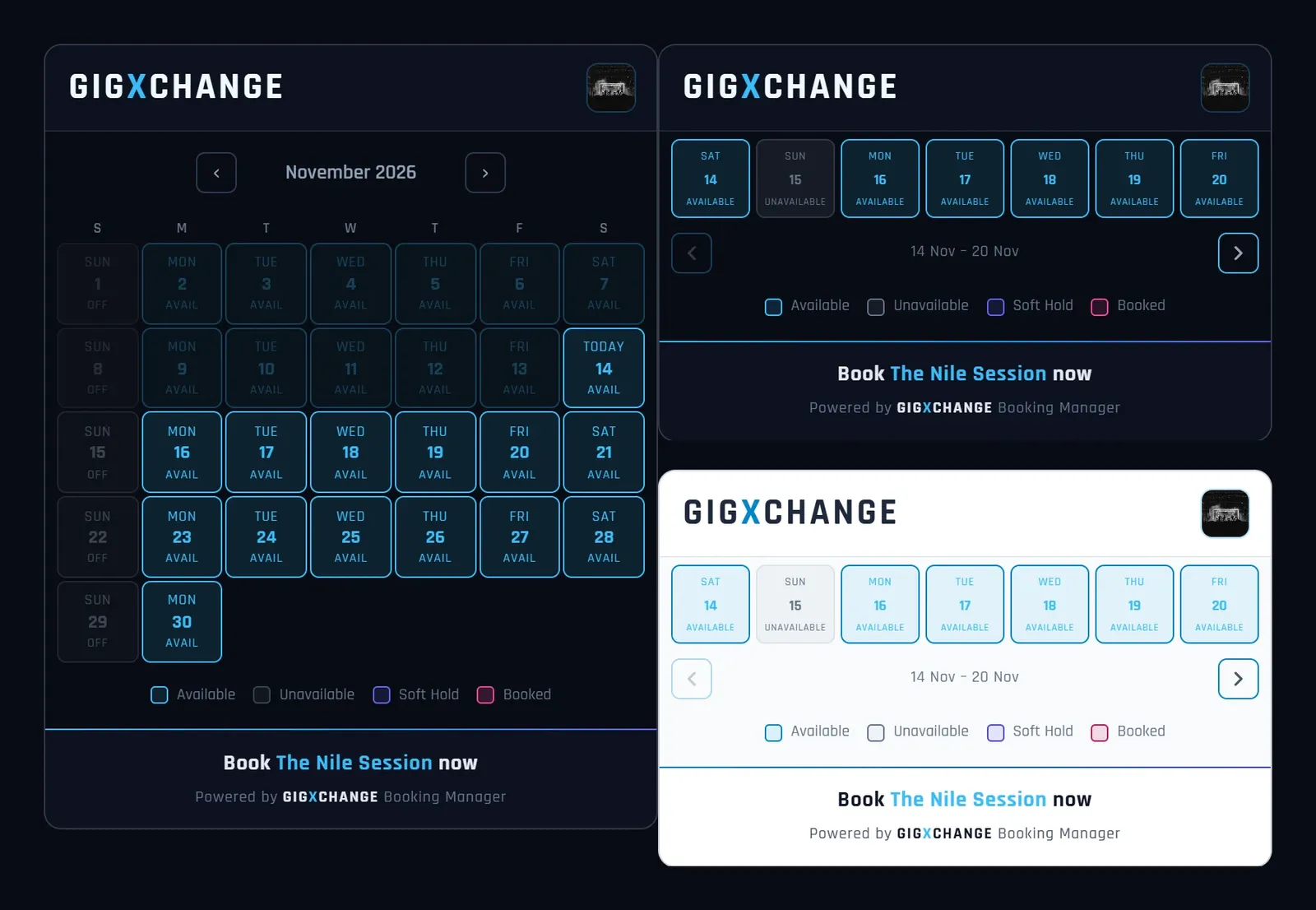
A capture of the live widget for a demo artist account, in both layouts. Yours shows your own free dates on your own site.
Get your widgetThe widget is a live window onto your GigXchange calendar, not another thing to keep updated: mark a date as taken once and your website, your profile and your booking page all show it straight away.
| AvailabilitySet your dates onceMark the dates you can play in your GigXchange calendar. Any booking in progress or confirmed on GigXchange blocks its date automatically. |
| EmbedPaste one snippet, doneCopy a small embed snippet into your website, EPK page or blog — no plugins, no developer, works on any site that accepts HTML. |
| Layouts2 layouts to fit any pageA full monthly calendar for your booking page, or a compact strip that tucks under your bio — both drawn in the GigXchange house style. |
| ThemesDark or lightMatch the widget to your site with a one-parameter theme switch, previewed before you copy. It draws its own frame, so it sits cleanly on any background. |
| Always currentUpdates itself, everywhereChange your availability once in the app and every embed on every site updates — no stale “DM me for dates” ever again. |
| Straight to youFrom a free date to your profileA click on a date or “Book now” opens your GigXchange profile, where the visitor can message you and book you direct. |
| In chat tooShare availability in messagesNegotiating dates with a venue? Drop a live availability card into the conversation instead of listing dates by hand. |
| Found by searchA link back to your profileThe snippet carries a plain “Book |
One snippet1
Paste it once, current for good. Copy a small embed snippet into your website, EPK page or blog — no plugins, no developer
Works on WordPress, Squarespace, Wix, Bandzoogle, Carrd
Any site that accepts HTML, up to 420px wide
A live window onto your profile — zero upkeep
Nothing to re-export or re-upload after the paste
Visitors click a date through to your profile
Step-by-step guide for the common site builders
| How it works | |
| Widget setup guide | |
| Find out more | |
| Create a free profile |
Two layouts2
Full calendar or compact strip. A full monthly calendar for your booking page, or a slim strip that tucks under your bio
Calendar: ~540px tall, for a dedicated page
Strip: ~270px, for sidebars and bios
Both shown LIVE on this page — real availability
Both drawn in the GigXchange house style
The widget draws its own frame on any background
| See them live | |
| Widget setup guide | |
| Find out more | |
| Create a free profile |
Two themes2
Dark or light, one parameter. Match the widget to your site with a one-parameter theme switch
Dark theme for dark sites, light for light
Previewed in the app before you copy
Change your availability once — every embed updates
GigXchange bookings block their dates automatically
Honest by construction
| How it works | |
| How to get more gigs | |
| Find out more | |
| Create a free profile |
Cost, ever£0
Free — the marketplace pays for it. No card, no plan, no per-site limits — embed it everywhere
No subscriptions and no listing fees
No commission on your booking fee
Agencies typically take 15–20%, some up to 25% — the widget takes nothing
GigXchange earns from its booking marketplace
One of 19 free tools on GigXchange
| All free tools | |
| How It Works | |
| Find out more | |
| Create a free profile |
Get startedFree
Built into every free profile. Sign up free, set your availability, paste the snippet once
Sign up in about 30 seconds — no card
Availability lives beside your gig calendar
Every booking carries a booking agreement
Free on iPhone, Android or any browser
| How it works | |
| All free tools | |
| Find out more | |
| Create a free profile |
Writing “DM for dates” costs you bookings because most people will not message to ask. Showing your free dates where they already find you lets a booker see a match and act on it in one visit.
Friction kills enquiries
Someone planning a wedding or a venue night shortlists several acts in one sitting. If your site answers "are they free on the 14th?" instantly and the next act's site says "message us to check", you just became the easy choice. Every extra step — finding the contact form, waiting for a reply, the back-and-forth — is a place the enquiry can die quietly.
A calendar that can't lie
Hand-maintained availability pages rot: the gig gets booked, the website doesn't get told. The widget reads your GigXchange calendar live, and any booking in progress or confirmed on GigXchange blocks its date automatically — so a date that's just been booked there disappears from every embed at once.
Put it where the decision happens
The full calendar layout belongs on your booking or contact page — the place someone lands when they're seriously checking dates. The compact strip earns its keep everywhere else: under the bio on your homepage, in your EPK, at the foot of a blog post. Two layouts, dark or light, both up to 420px wide, both from the same snippet with one parameter changed.
The click-through is the whole point
A visible free date is only half a booking — a click on the widget opens your GigXchange profile, where the visitor can message you and book you direct. That route comes with things an email thread doesn't: a booking agreement on every booking, protected payment when the booker pays through GigXchange, and no commission on your booking fee. The gig then lands in your calendar, which updates the widget, which keeps the loop honest.
Five minutes, once
Set availability, copy, paste — the step-by-step guide covers WordPress, Squarespace, Wix and friends. After that there is genuinely nothing to maintain. Pair it with the UK Gig Rate Calculator so that when the enquiries come, your quote is as ready as your calendar.
Every act here can put their live free dates on their own website from the same free profile with one snippet, and the calendar stays current every time they update their availability on GigXchange.
- Aimless
- Silver locket
- JacksonBerg25
- The Struts(provisional band name)
- Charlie Wilson
- Deacon Gault
- David Rybka
- Madeleine Flockhart
- Jude
- The House Of Pangari Production Company Ltd
- The Masquerade
- Shrug band
- David Wilson
- The Second Wave
- Jim Judges
- Repeat Offenders
- The Ultimate 80’s Party with Kezza
- Gordy Mac
- Anti-Meta
- Kelsey Dee
Your booking widget brings the enquiries in; these 11 tools handle what follows. Price the date with the Rate Calculator, send bookers an EPK that updates itself, promote the show with the Flyer Builder or Tour Poster, and invoice once it's played.
| RatesUK Gig Rate CalculatorLive market percentiles for every band size, city and event type — built on the GigXchange Index. Updated nightly. | |
| PromotionTour PosterYour gig list becomes a live tour page in 1 click — 7 designs, ticket links on every date, and an embed for your own website. | |
| MoneyInvoice GeneratorVAT-ready invoices built from your gig bookings — auto-numbered, branded PDF, tracked from unpaid to paid. | |
| Stage setupStage PlotA 3D stage and 2D plan, an input list and monitor mixes that fill themselves in, a PDF rider and a live embed. | |
| PromotionFlyer BuilderGig flyers in eleven editorial designs — prefilled from your booking, downloaded as a JPEG or published with an embed for your own site. | |
| Press kitEPK BuilderA press kit that updates itself — 18 blocks to arrange, live players, verified reviews and availability at one link. | |
| PromotionInstagram MicrositeOne link for your Instagram bio — music, free dates, gigs, reviews and a booking button, built from your profile in five looks. | |
| AudienceFans & Mailing ListAn audience you own — fans join from your profile, you send branded email updates with your flyers and posters attached. | |
| MatchingAI MatchesPick a free date, set a 60-second brief, get ranked best-fit venues — and pitch them with real booking invites. | |
| ContractsBooking Contract GeneratorEvery booking comes with its agreement: built from what you agreed, plain-English terms, signed by both sides in the app, PDF download. | |
| Set PlanningSetlist BuilderSets, intervals and running time against your slot, four looks, then a published page fans tap through, an embed and a printable gig sheet. | |
| BenchmarksGX IndexThe UK’s open, free rate dataset for live music. Search by city, genre and use case. Submit your own anonymous rates. | |
| ResearchUK Musician Earnings 2026Data-backed report on what UK musicians actually earn — the £8bn paradox, the income ladder, the 50% rule. Free, CC BY 4.0. |
Putting your dates on your own site raises practical questions, answered here: how to add the widget, which layouts and themes it supports, how it stays up to date, how people book you from it, and whether venues and promoters can use it.
| Tour poster | |
| Invoice generator | |
| Booking contracts | |
| All embed widgets | |
| All free tools |
| Widget setup guide | |
| How to get more gigs |
| Create a free profile | |
| How it works |
Being easy to book means setting your availability once and pasting the snippet once, then letting your website take booking enquiries while you play, with every request landing in your GigXchange inbox.

Booking manager: Your website, now taking bookings
Paste one snippet and your own website shows your live availability — visitors see the dates you're free and click through to book you on GigXchange. Two layouts, dark or light, always current. Free with every profile.



Last updated: 16 November 2026
How do you show your free dates on your site? One widget
GIGXCHANGE The Booking Manager is a free embed that shows a UK musician's live GigXchange availability on their own website. Copy the snippet from the app and paste it into WordPress, Squarespace, Wix or any site: it is a standard iframe up to 420px wide that shrinks to fit. Pick the full monthly calendar for a booking page or the compact strip for under a bio, in dark or light. It is live, not a screenshot: marking a date taken in the app updates every copy at once, and any GigXchange booking blocks its date automatically. A click on a date or Book now opens your profile, where visitors message and book you direct.
The worked example below is a capture of the live widget in both layouts, annotated.
The widget, live
This is a real GigXchange act’s availability, exactly as it appears on their own website: the full calendar for a dedicated booking page and the compact strip for a home page, both live, not screenshots.
- Is it my real availability?
- Yes. It reads the calendar you keep in GigXchange, so a date you mark taken, or one booked through GigXchange, shows as taken on every copy of the widget at once.
- Which websites can it go on?
- Any site that accepts an iframe: WordPress, Squarespace, Wix, Bandzoogle, Carrd and hand-built pages. It is up to 420 px wide and shrinks to fit a phone.
- Calendar or strip?
- The calendar (about 540 px tall) suits a dedicated booking page; the strip (about 270 px) sits under a bio or in a sidebar. Both come in dark or light.
One snippet, always current. Mark a date in the app and every copy of the widget updates. Sign up free to put yours on your site.
Walk the widget
The real Booking Manager in the GigXchange app, step by step: from the free and booked dates you keep in your calendar to the live booking calendar that appears on your own website.
A booker who finds you on your own website wants one answer before anything else: are you free on the night they need? If the answer is "message us to check", many of them move on to the next act. The Booking Manager puts the answer on your site, live, so the enquiry starts with a date that is actually free.
It works from one source: the availability you already keep in GigXchange. Below is the real thing, screen by screen - a jazz trio's calendar in the app, the pattern behind it, the embed window, and the two widgets as a visitor sees them.
- 01 / 05
Your availability
The Availability page in the app: how many nights are open, blocked and booked, with the two actions that matter right under them.
- At a glanceOpen, blocked and booked nights for the next 30 days.
- Edit patternSet the days you usually play once.
- Embed on your websiteGet the widget code from the same page.
This act has 25 open nights, 4 blocked and 1 booked over the next 30 days - 83% free. Gig Rescue is on, so venues and promoters can send them urgent invites for nights they are free.
- 02 / 05
The month
Every day of the month with its state, a key, the month's counts and the next free and next booked night.
- Tap to changeA tap cycles a date: available, unavailable, soft hold.
- Booked is automaticNights booked on GigXchange show as booked by themselves.
- What is nextThe next free night and the next booking, from today.
October has 6 days left: 5 open, 0 blocked and 1 booked. Monday 26 October is the next free night and Friday 30 October is booked.
- 03 / 05
Your pattern
Pick the rhythm your gigging follows, then mark the days - the calendar fills itself in from it.
- Four rhythmsEvery week, or every 2, 3 or 4 weeks.
- Set it onceChange it any time; single dates can still be blocked.
- Nothing to copyThe widget reads the same calendar.
This act repeats every week. A rotation that takes turns - every 2, 3 or 4 weeks - suits players who split their nights between bands or residencies.
- 04 / 05
Embed on your website
Choose the style and theme, see the live preview, and copy the code for your site.
- Two stylesA full calendar or a compact strip.
- Dark or lightMatch your website's look.
- Live previewWhat you see is the widget your visitors get.
The calendar style in the dark theme, previewing this act's October. Copy code puts the snippet on your clipboard; it stays up to date automatically.
- 05 / 05
On your website
The two widgets as a visitor sees them: the full calendar for a booking page and the strip for a bio or sidebar.
- LiveThe same dates as the app, updated as you change them.
- Book nowA tap takes the visitor to your GigXchange profile to book.
- Fits a phoneUp to 420 px wide and shrinks to fit.
Both widgets show Friday 30 October as booked and Monday to Saturday otherwise free, with a "Book The Nile Session now" link under each.
- 01 / 05
Your availability
The Availability page in the app: how many nights are open, blocked and booked, with the two actions that matter right under them.
- At a glanceOpen, blocked and booked nights for the next 30 days.
- Edit patternSet the days you usually play once.
- Embed on your websiteGet the widget code from the same page.
This act has 25 open nights, 4 blocked and 1 booked over the next 30 days - 83% free. Gig Rescue is on, so venues and promoters can send them urgent invites for nights they are free.
- 02 / 05
The month
Every day of the month with its state, a key, the month's counts and the next free and next booked night.
- Tap to changeA tap cycles a date: available, unavailable, soft hold.
- Booked is automaticNights booked on GigXchange show as booked by themselves.
- What is nextThe next free night and the next booking, from today.
October has 6 days left: 5 open, 0 blocked and 1 booked. Monday 26 October is the next free night and Friday 30 October is booked.
- 03 / 05
Your pattern
Pick the rhythm your gigging follows, then mark the days - the calendar fills itself in from it.
- Four rhythmsEvery week, or every 2, 3 or 4 weeks.
- Set it onceChange it any time; single dates can still be blocked.
- Nothing to copyThe widget reads the same calendar.
This act repeats every week. A rotation that takes turns - every 2, 3 or 4 weeks - suits players who split their nights between bands or residencies.
- 04 / 05
Embed on your website
Choose the style and theme, see the live preview, and copy the code for your site.
- Two stylesA full calendar or a compact strip.
- Dark or lightMatch your website's look.
- Live previewWhat you see is the widget your visitors get.
The calendar style in the dark theme, previewing this act's October. Copy code puts the snippet on your clipboard; it stays up to date automatically.
- 05 / 05
On your website
The two widgets as a visitor sees them: the full calendar for a booking page and the strip for a bio or sidebar.
- LiveThe same dates as the app, updated as you change them.
- Book nowA tap takes the visitor to your GigXchange profile to book.
- Fits a phoneUp to 420 px wide and shrinks to fit.
Both widgets show Friday 30 October as booked and Monday to Saturday otherwise free, with a "Book The Nile Session now" link under each.
How it works
The Booking Manager turns availability nobody can see into a self-serve booking funnel in four short steps: keep your calendar, pick a layout, paste one snippet into your website and let visitors book your free dates.
Mark when you can play
Your availability lives in the same calendar as your GigXchange bookings, and a booking blocks its own date.
Layout and theme
Full calendar or compact strip, dark or light — previewed live before you copy anything.
One snippet, any site
Copy the embed into your website, EPK or blog. No plugins, no code knowledge, up to 420px wide.
Straight to your profile
Visitors click a date or “Book now” through to your profile, where they message you and book you direct.
Worked example
A capture of the live availability widget as visitors to your site see it, annotated: the calendar and the strip, dark and light, and what a click does.
A capture of the live widget for a demo artist account, in both layouts. Yours shows your own free dates on your own site.
Get your widgetEverything in the widget
The widget is a live window onto your GigXchange calendar, not another thing to keep updated: mark a date as taken once and your website, your profile and your booking page all show it straight away.
Set your dates once
Mark the dates you can play in your GigXchange calendar. Any booking in progress or confirmed on GigXchange blocks its date automatically.
Paste one snippet, done
Copy a small embed snippet into your website, EPK page or blog — no plugins, no developer, works on any site that accepts HTML.
2 layouts to fit any page
A full monthly calendar for your booking page, or a compact strip that tucks under your bio — both drawn in the GigXchange house style.
Dark or light
Match the widget to your site with a one-parameter theme switch, previewed before you copy. It draws its own frame, so it sits cleanly on any background.
Updates itself, everywhere
Change your availability once in the app and every embed on every site updates — no stale “DM me for dates” ever again.
From a free date to your profile
A click on a date or “Book now” opens your GigXchange profile, where the visitor can message you and book you direct.
Share availability in messages
Negotiating dates with a venue? Drop a live availability card into the conversation instead of listing dates by hand.
A link back to your profile
The snippet carries a plain “Book
Why “DM for dates” is costing you bookings
Writing “DM for dates” costs you bookings because most people will not message to ask. Showing your free dates where they already find you lets a booker see a match and act on it in one visit.
Friction kills enquiries
Someone planning a wedding or a venue night shortlists several acts in one sitting. If your site answers "are they free on the 14th?" instantly and the next act's site says "message us to check", you just became the easy choice. Every extra step — finding the contact form, waiting for a reply, the back-and-forth — is a place the enquiry can die quietly.
A calendar that can't lie
Hand-maintained availability pages rot: the gig gets booked, the website doesn't get told. The widget reads your GigXchange calendar live, and any booking in progress or confirmed on GigXchange blocks its date automatically — so a date that's just been booked there disappears from every embed at once.
Put it where the decision happens
The full calendar layout belongs on your booking or contact page — the place someone lands when they're seriously checking dates. The compact strip earns its keep everywhere else: under the bio on your homepage, in your EPK, at the foot of a blog post. Two layouts, dark or light, both up to 420px wide, both from the same snippet with one parameter changed.
The click-through is the whole point
A visible free date is only half a booking — a click on the widget opens your GigXchange profile, where the visitor can message you and book you direct. That route comes with things an email thread doesn't: a booking agreement on every booking, protected payment when the booker pays through GigXchange, and no commission on your booking fee. The gig then lands in your calendar, which updates the widget, which keeps the loop honest.
Five minutes, once
Set availability, copy, paste — the step-by-step guide covers WordPress, Squarespace, Wix and friends. After that there is genuinely nothing to maintain. Pair it with the UK Gig Rate Calculator so that when the enquiries come, your quote is as ready as your calendar.
Artists already on GigXchange
Every act here can put their live free dates on their own website from the same free profile with one snippet, and the calendar stays current every time they update their availability on GigXchange.



















Browse UK artist profiles · GigXchange for artists · Create a free artist profile














More free tools for artists
13 more free tools and resources for gigging artists, including the UK Gig Rate Calculator, Tour Poster and Invoice Generator. None of them needs a card or a paid plan, and the ones that save your work keep it in the same free artist profile you get booked with, so nothing is set up twice.
UK Gig Rate Calculator
Live market percentiles for every band size, city and event type — built on the GigXchange Index. Updated nightly.
Tour Poster
Your gig list becomes a live tour page in 1 click — 7 designs, ticket links on every date, and an embed for your own website.
Invoice Generator
VAT-ready invoices built from your gig bookings — auto-numbered, branded PDF, tracked from unpaid to paid.
Stage Plot
A 3D stage and 2D plan, an input list and monitor mixes that fill themselves in, a PDF rider and a live embed.
Flyer Builder
Gig flyers in eleven editorial designs — prefilled from your booking, downloaded as a JPEG or published with an embed for your own site.
EPK Builder
A press kit that updates itself — 18 blocks to arrange, live players, verified reviews and availability at one link.
Instagram Microsite
One link for your Instagram bio — music, free dates, gigs, reviews and a booking button, built from your profile in five looks.
Fans & Mailing List
An audience you own — fans join from your profile, you send branded email updates with your flyers and posters attached.
AI Matches
Pick a free date, set a 60-second brief, get ranked best-fit venues — and pitch them with real booking invites.
Booking Contract Generator
Every booking comes with its agreement: built from what you agreed, plain-English terms, signed by both sides in the app, PDF download.
Setlist Builder
Sets, intervals and running time against your slot, four looks, then a published page fans tap through, an embed and a printable gig sheet.
GX Index
The UK’s open, free rate dataset for live music. Search by city, genre and use case. Submit your own anonymous rates.
UK Musician Earnings 2026
Data-backed report on what UK musicians actually earn — the £8bn paradox, the income ladder, the 50% rule. Free, CC BY 4.0.
Frequently asked questions
Putting your dates on your own site raises practical questions, answered here: how to add the widget, which layouts and themes it supports, how it stays up to date, how people book you from it, and whether venues and promoters can use it.
Be the act that’s easy to book
Being easy to book means setting your availability once and pasting the snippet once, then letting your website take booking enquiries while you play, with every request landing in your GigXchange inbox.