Free tool · Promotion
The link in bio built for musicians
One link for your Instagram bio: your music, free dates, upcoming gigs and a booking button. GigXchange builds it from your profile, so it is ready before you touch anything.
Updated 26 October 2026
01 — See it
5 looksYour Instagram Microsite
Walk the microsite
A real Instagram Microsite on GigXchange, screen by screen - the page a follower opens from an artist's bio, then the editor behind it.
Every "link in bio" story sends people to the same place. Fans after tickets, a promoter checking the music and a venue looking for a free Friday all go through it - so whatever sits behind it has to answer all three, and still be right after next week's gig.
The Instagram Microsite is built from your GigXchange profile instead, so it moves when your profile moves. Below is a real one - The Velvet Pines, a folk duo from Cardiff - exactly as a follower sees it on a phone, and then the editor where the artist picks the look.
- 01 / 05
The first screen
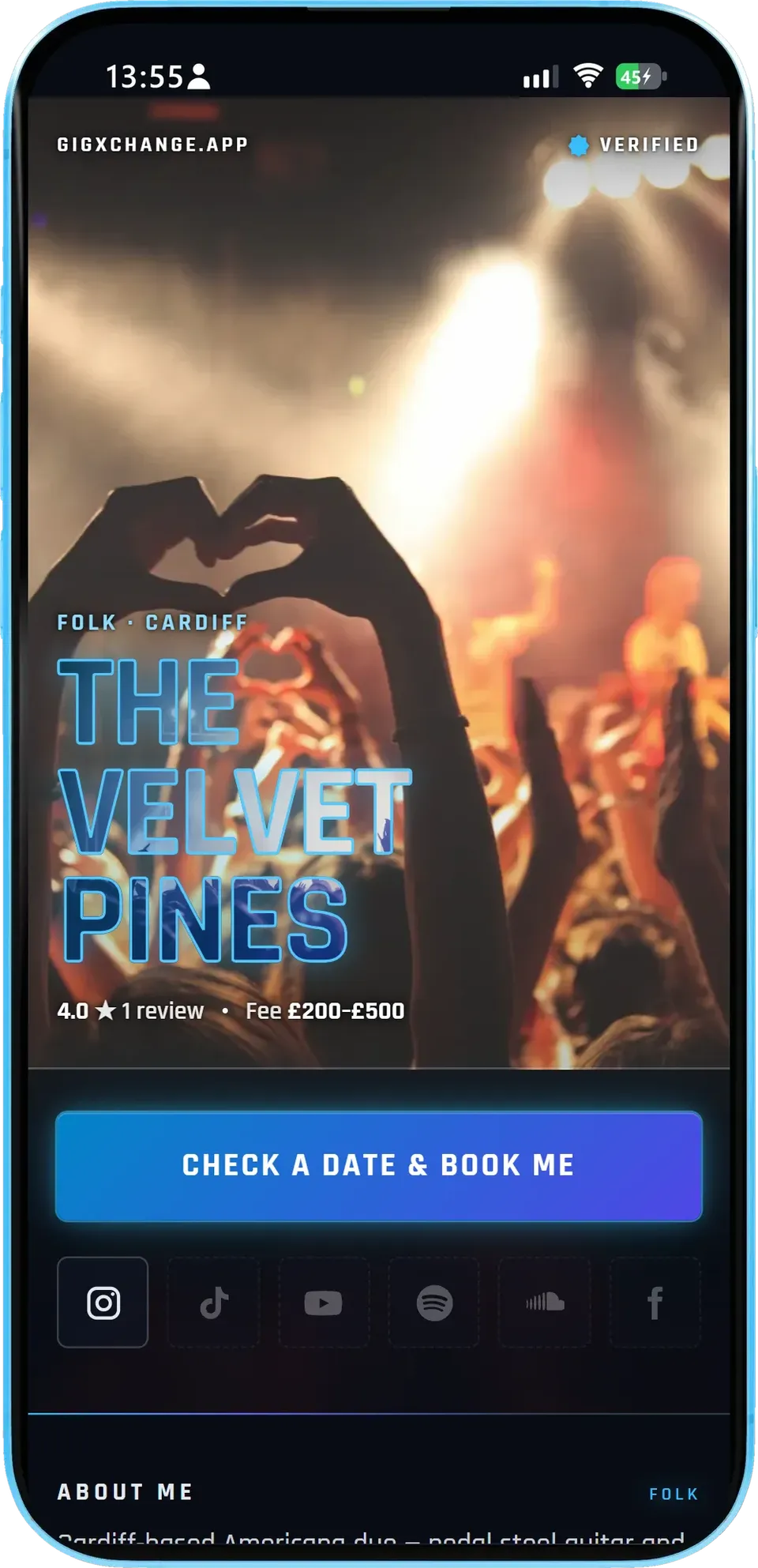
The artist's name over their own photo, the genre and home town, then the booking button and the social links.
- Who and whereFolk, Cardiff - the two things a booker checks first.
- Book meCheck a date & book me opens the free dates.
- SocialsThe slots for the accounts the artist has added light up.
The Velvet Pines show a 4.0 rating from 1 review and a fee of £200-£500 under the name. Their Instagram slot is lit because it is on their profile; the other five slots wait for links they have not added yet.
- 02 / 05
Free dates
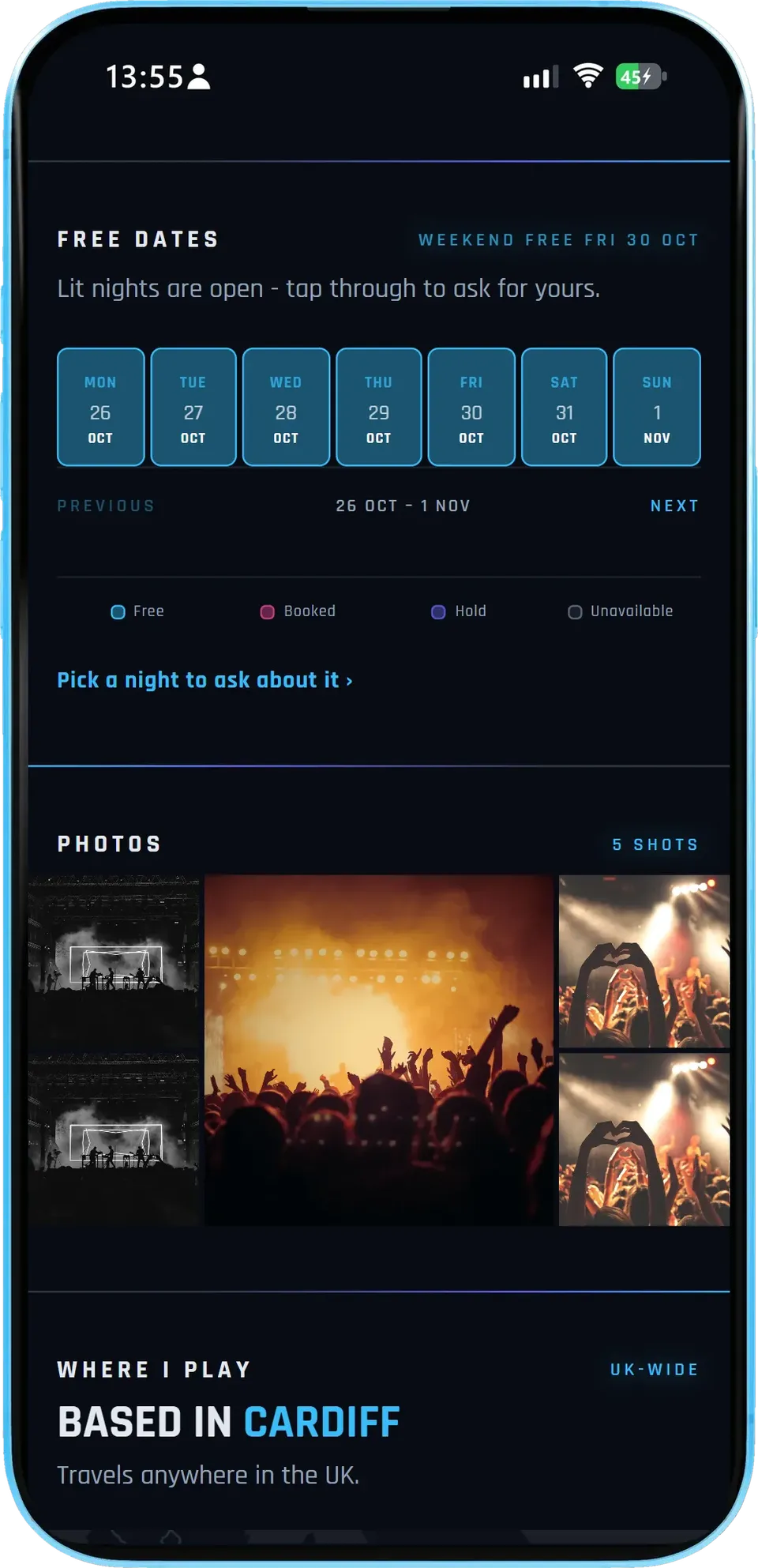
The availability the artist already keeps on GigXchange, a week at a time, with a line saying when the next free weekend is.
- LiveIt reads the same calendar the artist keeps for bookings.
- Ask for a nightVenues, promoters and organisers request a free date on the public page.
- PhotosThe profile photos follow as a strip.
Here the week of 26 October to 1 November is open every night, and the header reads Weekend free Fri 30 Oct. Five photos sit underneath.
- 03 / 05
Where they play, by the numbers
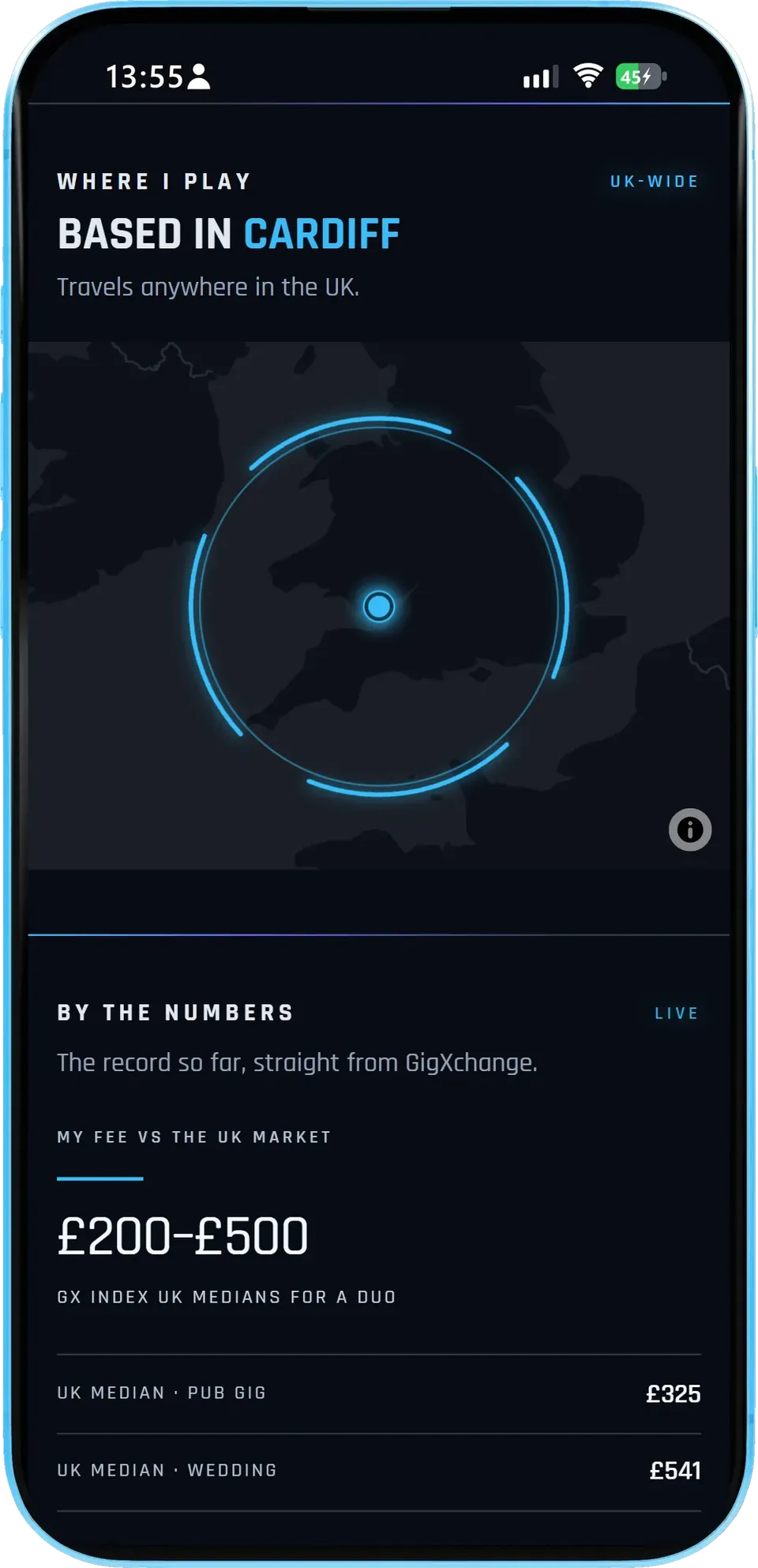
A map of the home city and how far the act travels, then the record so far straight from GigXchange.
- TravelBased in Cardiff, travels anywhere in the UK.
- Fee in contextThe artist's range beside the GX Index medians for their act size.
- Live mediansThe UK medians update as the GX Index does.
The fee of £200-£500 sits beside the GX Index UK medians for a duo: £325 for a pub gig and £541 for a wedding.
- 04 / 05
For bookers and fans
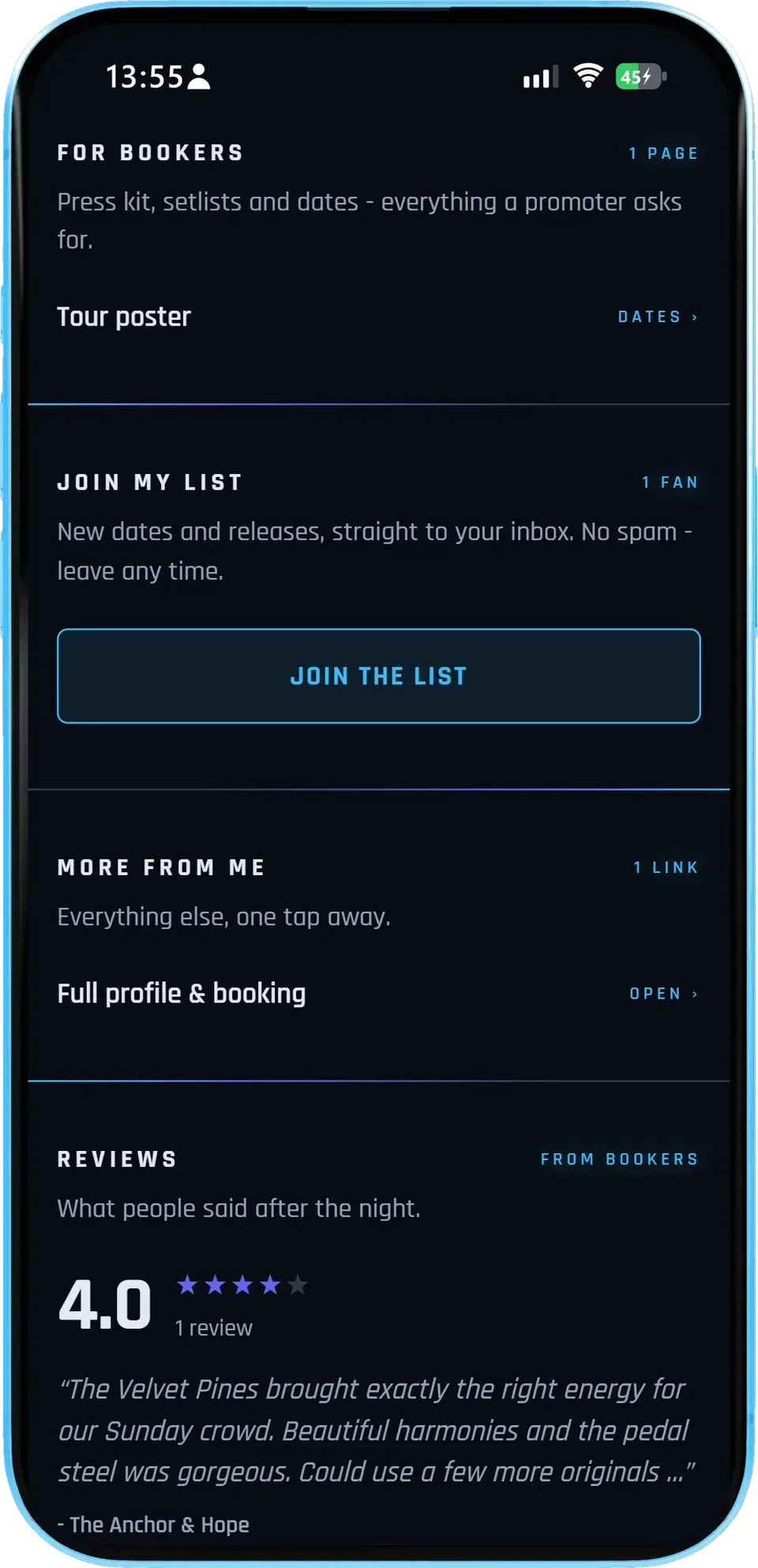
The pages a promoter asks for, a sign-up for fans, any extra links, and what bookers said after the night.
- For bookersOne tap to the pages a promoter asks for - here the tour poster.
- Join my listFans sign up to the artist's mailing list.
- ReviewsReal reviews from venues that booked them.
The Velvet Pines link their tour poster for bookers, have 1 fan on their list and a 4.0 review from The Anchor & Hope about their harmonies and pedal steel.
- 05 / 05
The editor
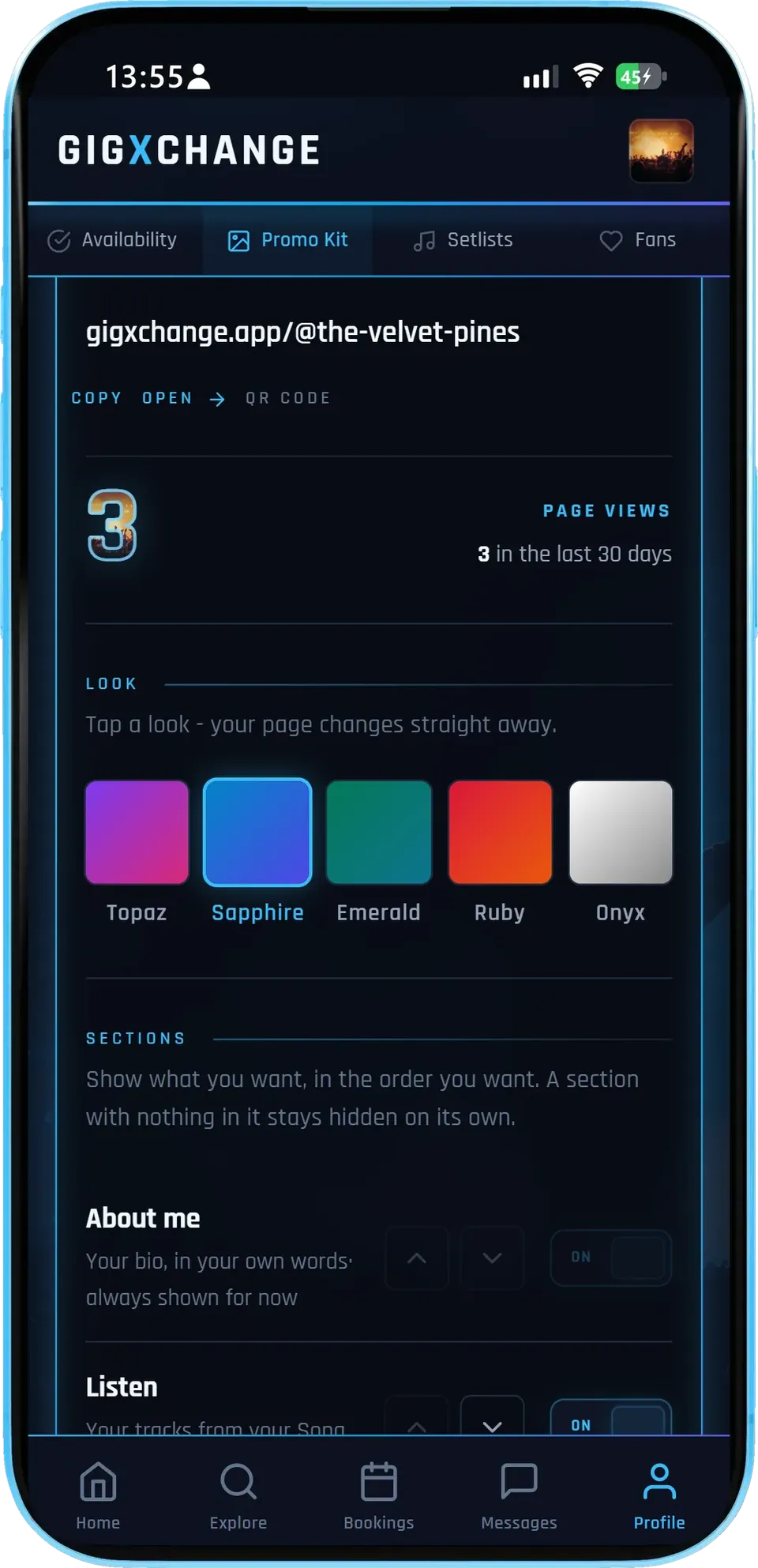
In the app, under Promo Kit: the link to paste into Instagram, how many visits the page had, the five looks and the section switches.
- Copy or QRCopy the link, open the page or show the QR code.
- Five looksTap one and the page changes straight away.
- Saves as you goHide or move a section - there is no Save button.
This editor shows gigxchange.app/@the-velvet-pines with 3 page views in the last 30 days, the Sapphire look selected, and the sections list starting with About me and Listen.
- 01 / 05
The first screen
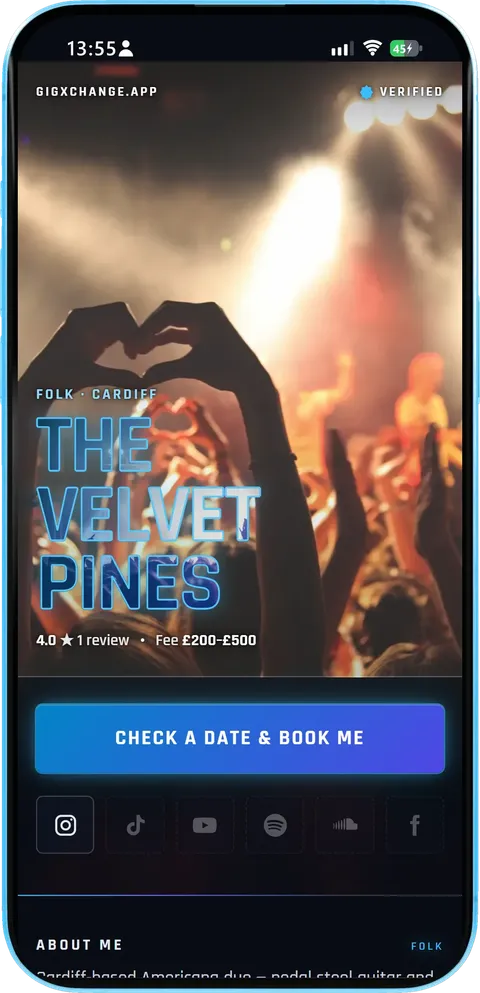
The artist's name over their own photo, the genre and home town, then the booking button and the social links.
- Who and whereFolk, Cardiff - the two things a booker checks first.
- Book meCheck a date & book me opens the free dates.
- SocialsThe slots for the accounts the artist has added light up.
The Velvet Pines show a 4.0 rating from 1 review and a fee of £200-£500 under the name. Their Instagram slot is lit because it is on their profile; the other five slots wait for links they have not added yet.
- 02 / 05
Free dates
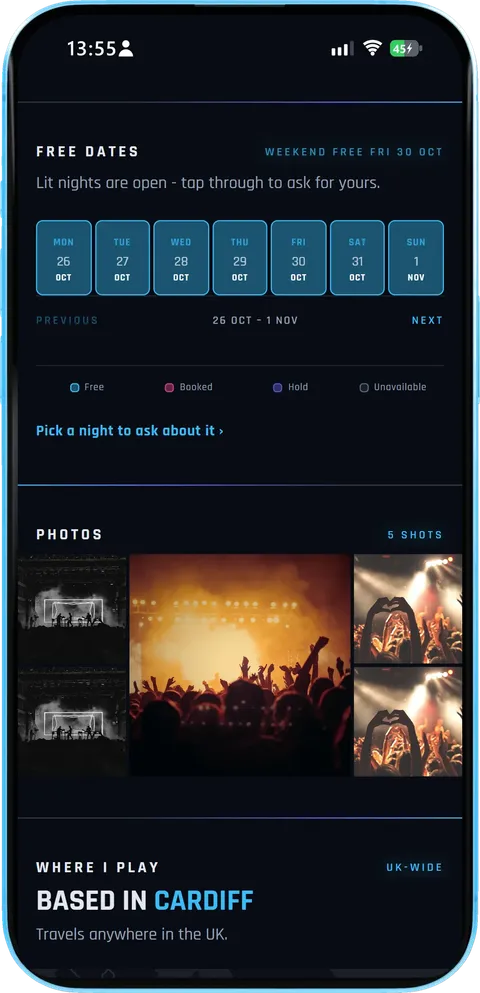
The availability the artist already keeps on GigXchange, a week at a time, with a line saying when the next free weekend is.
- LiveIt reads the same calendar the artist keeps for bookings.
- Ask for a nightVenues, promoters and organisers request a free date on the public page.
- PhotosThe profile photos follow as a strip.
Here the week of 26 October to 1 November is open every night, and the header reads Weekend free Fri 30 Oct. Five photos sit underneath.
- 03 / 05
Where they play, by the numbers
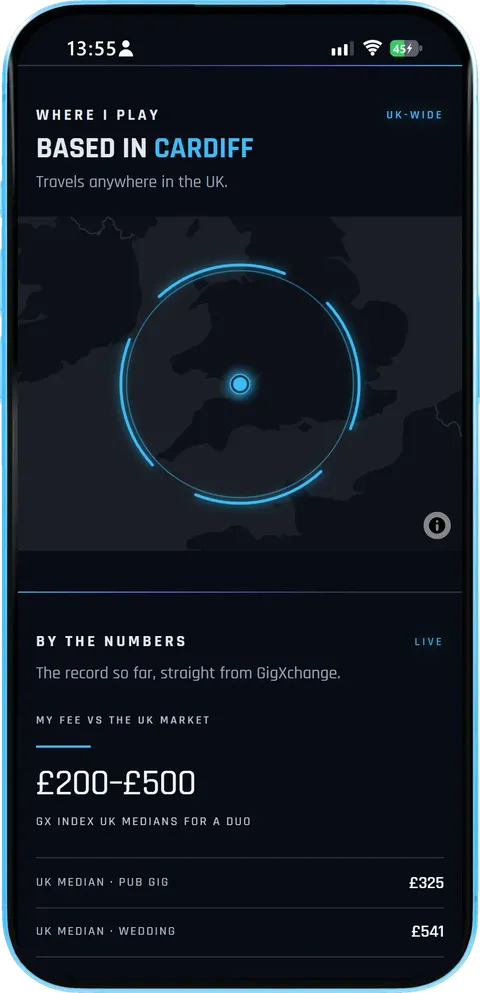
A map of the home city and how far the act travels, then the record so far straight from GigXchange.
- TravelBased in Cardiff, travels anywhere in the UK.
- Fee in contextThe artist's range beside the GX Index medians for their act size.
- Live mediansThe UK medians update as the GX Index does.
The fee of £200-£500 sits beside the GX Index UK medians for a duo: £325 for a pub gig and £541 for a wedding.
- 04 / 05
For bookers and fans
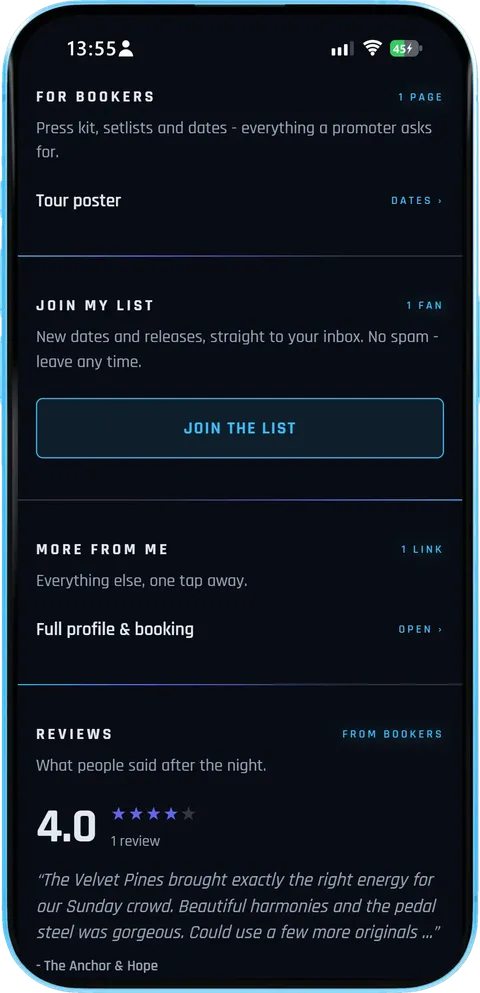
The pages a promoter asks for, a sign-up for fans, any extra links, and what bookers said after the night.
- For bookersOne tap to the pages a promoter asks for - here the tour poster.
- Join my listFans sign up to the artist's mailing list.
- ReviewsReal reviews from venues that booked them.
The Velvet Pines link their tour poster for bookers, have 1 fan on their list and a 4.0 review from The Anchor & Hope about their harmonies and pedal steel.
- 05 / 05
The editor
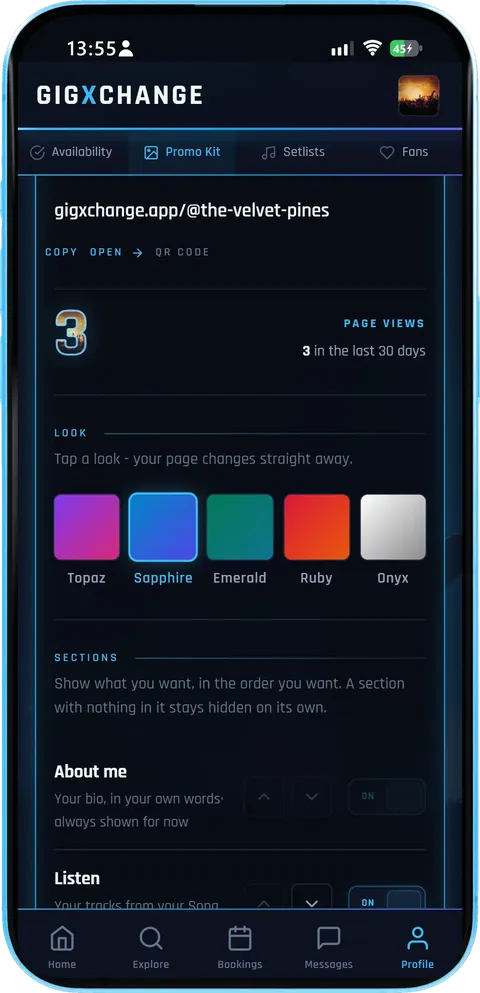
In the app, under Promo Kit: the link to paste into Instagram, how many visits the page had, the five looks and the section switches.
- Copy or QRCopy the link, open the page or show the QR code.
- Five looksTap one and the page changes straight away.
- Saves as you goHide or move a section - there is no Save button.
This editor shows gigxchange.app/@the-velvet-pines with 3 page views in the last 30 days, the Sapphire look selected, and the sections list starting with About me and Listen.
How it works
From profile to a link in your bio in four short steps - most of it is already done.
| 01 | ProfileIt builds itselfYour music, photos, dates, gigs, reviews and links come straight from your GigXchange artist profile. There is nothing to set up first. |
| 02 | StylePick a lookFive looks - Sapphire, Topaz, Ruby, Onyx and Emerald. Hide or reorder six sections. The editor saves as you go. |
| 03 | SharePaste it onceCopy gigxchange.app/@your-name into your Instagram bio, or show the QR code at the merch table. It stays the same unless you rename your profile. |
| 04 | BookBookers ask for a dateVenues, promoters and organisers request a free night from your calendar on the page; the request lands in your GigXchange inbox. |
Everything on the page
One link that answers what a fan or a booker wants to know, without you keeping it up to date.
| AutomaticBuilt from your profileMusic, photos, free dates, upcoming gigs and reviews come from your GigXchange profile, so the page shows your latest on its own. |
| BookingsFree dates, liveYour availability calendar sits on the page. Venues, promoters and organisers request a free night straight from it. |
| StyleFive looksSapphire, Topaz, Ruby, Onyx or Emerald. Tap a look and the whole page changes - the editor saves as you go. |
| ControlSix sections you arrangeHide or reorder Listen, Free dates, Watch, More links, Reviews and Join my list. Listen, Watch and Reviews stay hidden until you have something to show. |
| LinksYour socials, lit upInstagram, TikTok, YouTube, Spotify, SoundCloud and Facebook light up from your profile - six slots on every artist page. |
| BookersWhere you play, by the numbersYour home city and how far you travel, your fee beside the GX Index medians for your act size, your rating and followers. |
| FansJoin my listFans can join your mailing list from the page, the same list you send updates to from Fans & Mailing List. |
| InsightPage viewsThe editor shows how many visits your page had in the last 30 days, next to your link and QR code. |
Your link1
One address, always current. gigxchange.app/@your-name - paste it into your Instagram bio once
Built from your GigXchange profile
Shows your latest without editing
Copy the link or show the QR code
The same address on every device
No setup before it is ready
| How it works | |
| EPK Builder | |
| Find out more | |
| Create a free artist profile |
Looks5
Tap one, the page changes. Sapphire, Topaz, Ruby, Onyx and Emerald
The editor saves as you go - no Save button
Hide or reorder six sections
Listen, Watch and Reviews wait until you have content
Preview before you share
| How it works | |
| Flyer Builder | |
| Find out more | |
| Create a free artist profile |
Free datesLive
Your calendar, on the page. Venues, promoters and organisers request a free night straight from it
Reads the availability you already keep
Nights marked unavailable are never offered
Anyone else taps through to your profile
Upcoming gigs show beside it
| Booking Manager | |
| How it works | |
| Find out more | |
| Create a free artist profile |
Cost, ever£0
Free - the marketplace pays for it. Every look, every section, the QR code - free forever
No subscriptions and no trial
No card needed
GigXchange earns from its booking marketplace
Part of the full free artist toolkit
| All free tools | |
| For artists | |
| Find out more | |
| Create a free artist profile |
Get startedFree
Built into every artist profile. Fill in your profile and your microsite is already there
Sign up in about 30 seconds - no card
Lives in Promo Kit beside the EPK
Free on iPhone, Android or any browser
| How it works | |
| All free tools | |
| Find out more | |
| Create a free artist profile |
One link has to do a lot of work
Your bio link is where every "link in bio" sends people. What goes behind it decides whether a follower becomes a fan, and a fan becomes a booking.
The bio link is the busiest link you have
Every story that says "link in bio" sends people through the same link - fans after tickets, a promoter checking whether you are any good, a venue looking for a free Friday. If that link points at one release or one ticket page, everyone else hits a dead end.
A page that keeps itself current
The Instagram Microsite reads your GigXchange profile: add a gig, a review or a free date there and the page shows it. You only open the editor to change the look or the order of the sections.
Put the booking where the bookers already are
Promoters and venue bookers scroll Instagram like everyone else. With your free dates on the page, a venue, promoter or event organiser can ask for a night straight away instead of messaging you and waiting. The request lands in your GigXchange inbox with the date attached - see how bookings work on GigXchange for artists.
Turn followers into a list you own
Followers belong to the platform; a mailing list belongs to you. Join my list on the page signs fans up to the same list you email from Fans & Mailing List, so the next tour announcement reaches them even when the algorithm does not.
One profile, many pages
The microsite is one of several pages built from the same profile: the EPK for pitching promoters, the tour poster for your run of dates and the booking widget for your own website. Keep the profile current and all of them follow.
Artists already on GigXchange
Every artist here has a free profile - and with it an Instagram Microsite, the EPK and the booking calendar in one place.
More free tools for artists
13 more free tools and resources for gigging artists.
| RatesUK Gig Rate CalculatorLive market percentiles for every band size, city and event type — built on the GigXchange Index. Updated nightly. | |
| PromotionTour PosterYour gig list becomes a live tour page in 1 click — 7 designs, ticket links on every date, and an embed for your own website. | |
| MoneyInvoice GeneratorVAT-ready invoices built from your gig bookings — auto-numbered, branded PDF, tracked from unpaid to paid. | |
| Stage setupStage PlotA 3D stage and 2D plan, an input list and monitor mixes that fill themselves in, a PDF rider and a live embed. | |
| PromotionFlyer BuilderGig flyers in eleven editorial designs — prefilled from your booking, downloaded as a JPEG or published with an embed for your own site. | |
| BookingsBooking ManagerYour live availability embedded on your own website — visitors see free dates and book you direct. One snippet, zero upkeep. | |
| Press kitEPK BuilderA press kit that updates itself — 18 blocks to arrange, live players, verified reviews and availability at one link. | |
| AudienceFans & Mailing ListAn audience you own — fans join from your profile, you send branded email updates with your flyers and posters attached. | |
| MatchingAI MatchesPick a free date, set a 60-second brief, get ranked best-fit venues — and pitch them with real booking invites. | |
| ContractsBooking Contract GeneratorEvery booking comes with its agreement: built from what you agreed, plain-English terms, signed by both sides in the app, PDF download. | |
| Set PlanningSetlist BuilderSets, intervals and running time against your slot, four looks, then a published page fans tap through, an embed and a printable gig sheet. | |
| BenchmarksGX IndexThe UK’s open, free rate dataset for live music. Search by city, genre and use case. Submit your own anonymous rates. | |
| ResearchUK Musician Earnings 2026Data-backed report on what UK musicians actually earn — the £8bn paradox, the income ladder, the 50% rule. Free, CC BY 4.0. |
09 — Questions8 answersFrequently asked questions
What artists ask before they swap the link in their bio.
| EPK builder | |
| Booking manager | |
| Fans & mailing list | |
| All free tools |
| Add a website on Instagram | |
| Tour poster maker | |
| Live gig directory |
| Create a free artist profile | |
| How it works |
Make the link in your bio work
Sign up free, fill in your profile, and your Instagram Microsite is ready to paste.

The link in bio built for musicians
One link for your Instagram bio: your music, free dates, upcoming gigs and a booking button. GigXchange builds it from your profile, so it is ready before you touch anything.


Last updated: 26 October 2026
Walk the microsite
A real Instagram Microsite on GigXchange, screen by screen - the page a follower opens from an artist's bio, then the editor behind it.
Every "link in bio" story sends people to the same place. Fans after tickets, a promoter checking the music and a venue looking for a free Friday all go through it - so whatever sits behind it has to answer all three, and still be right after next week's gig.
The Instagram Microsite is built from your GigXchange profile instead, so it moves when your profile moves. Below is a real one - The Velvet Pines, a folk duo from Cardiff - exactly as a follower sees it on a phone, and then the editor where the artist picks the look.
- 01 / 05
The first screen
The artist's name over their own photo, the genre and home town, then the booking button and the social links.
- Who and whereFolk, Cardiff - the two things a booker checks first.
- Book meCheck a date & book me opens the free dates.
- SocialsThe slots for the accounts the artist has added light up.
The Velvet Pines show a 4.0 rating from 1 review and a fee of £200-£500 under the name. Their Instagram slot is lit because it is on their profile; the other five slots wait for links they have not added yet.
- 02 / 05
Free dates
The availability the artist already keeps on GigXchange, a week at a time, with a line saying when the next free weekend is.
- LiveIt reads the same calendar the artist keeps for bookings.
- Ask for a nightVenues, promoters and organisers request a free date on the public page.
- PhotosThe profile photos follow as a strip.
Here the week of 26 October to 1 November is open every night, and the header reads Weekend free Fri 30 Oct. Five photos sit underneath.
- 03 / 05
Where they play, by the numbers
A map of the home city and how far the act travels, then the record so far straight from GigXchange.
- TravelBased in Cardiff, travels anywhere in the UK.
- Fee in contextThe artist's range beside the GX Index medians for their act size.
- Live mediansThe UK medians update as the GX Index does.
The fee of £200-£500 sits beside the GX Index UK medians for a duo: £325 for a pub gig and £541 for a wedding.
- 04 / 05
For bookers and fans
The pages a promoter asks for, a sign-up for fans, any extra links, and what bookers said after the night.
- For bookersOne tap to the pages a promoter asks for - here the tour poster.
- Join my listFans sign up to the artist's mailing list.
- ReviewsReal reviews from venues that booked them.
The Velvet Pines link their tour poster for bookers, have 1 fan on their list and a 4.0 review from The Anchor & Hope about their harmonies and pedal steel.
- 05 / 05
The editor
In the app, under Promo Kit: the link to paste into Instagram, how many visits the page had, the five looks and the section switches.
- Copy or QRCopy the link, open the page or show the QR code.
- Five looksTap one and the page changes straight away.
- Saves as you goHide or move a section - there is no Save button.
This editor shows gigxchange.app/@the-velvet-pines with 3 page views in the last 30 days, the Sapphire look selected, and the sections list starting with About me and Listen.
- 01 / 05
The first screen
The artist's name over their own photo, the genre and home town, then the booking button and the social links.
- Who and whereFolk, Cardiff - the two things a booker checks first.
- Book meCheck a date & book me opens the free dates.
- SocialsThe slots for the accounts the artist has added light up.
The Velvet Pines show a 4.0 rating from 1 review and a fee of £200-£500 under the name. Their Instagram slot is lit because it is on their profile; the other five slots wait for links they have not added yet.
- 02 / 05
Free dates
The availability the artist already keeps on GigXchange, a week at a time, with a line saying when the next free weekend is.
- LiveIt reads the same calendar the artist keeps for bookings.
- Ask for a nightVenues, promoters and organisers request a free date on the public page.
- PhotosThe profile photos follow as a strip.
Here the week of 26 October to 1 November is open every night, and the header reads Weekend free Fri 30 Oct. Five photos sit underneath.
- 03 / 05
Where they play, by the numbers
A map of the home city and how far the act travels, then the record so far straight from GigXchange.
- TravelBased in Cardiff, travels anywhere in the UK.
- Fee in contextThe artist's range beside the GX Index medians for their act size.
- Live mediansThe UK medians update as the GX Index does.
The fee of £200-£500 sits beside the GX Index UK medians for a duo: £325 for a pub gig and £541 for a wedding.
- 04 / 05
For bookers and fans
The pages a promoter asks for, a sign-up for fans, any extra links, and what bookers said after the night.
- For bookersOne tap to the pages a promoter asks for - here the tour poster.
- Join my listFans sign up to the artist's mailing list.
- ReviewsReal reviews from venues that booked them.
The Velvet Pines link their tour poster for bookers, have 1 fan on their list and a 4.0 review from The Anchor & Hope about their harmonies and pedal steel.
- 05 / 05
The editor
In the app, under Promo Kit: the link to paste into Instagram, how many visits the page had, the five looks and the section switches.
- Copy or QRCopy the link, open the page or show the QR code.
- Five looksTap one and the page changes straight away.
- Saves as you goHide or move a section - there is no Save button.
This editor shows gigxchange.app/@the-velvet-pines with 3 page views in the last 30 days, the Sapphire look selected, and the sections list starting with About me and Listen.
How it works
From profile to a link in your bio in four short steps - most of it is already done.
It builds itself
Your music, photos, dates, gigs, reviews and links come straight from your GigXchange artist profile. There is nothing to set up first.
Pick a look
Five looks - Sapphire, Topaz, Ruby, Onyx and Emerald. Hide or reorder six sections. The editor saves as you go.
Paste it once
Copy gigxchange.app/@your-name into your Instagram bio, or show the QR code at the merch table. It stays the same unless you rename your profile.
Bookers ask for a date
Venues, promoters and organisers request a free night from your calendar on the page; the request lands in your GigXchange inbox.
Everything on the page
One link that answers what a fan or a booker wants to know, without you keeping it up to date.
Built from your profile
Music, photos, free dates, upcoming gigs and reviews come from your GigXchange profile, so the page shows your latest on its own.
Free dates, live
Your availability calendar sits on the page. Venues, promoters and organisers request a free night straight from it.
Five looks
Sapphire, Topaz, Ruby, Onyx or Emerald. Tap a look and the whole page changes - the editor saves as you go.
Six sections you arrange
Hide or reorder Listen, Free dates, Watch, More links, Reviews and Join my list. Listen, Watch and Reviews stay hidden until you have something to show.
Your socials, lit up
Instagram, TikTok, YouTube, Spotify, SoundCloud and Facebook light up from your profile - six slots on every artist page.
Where you play, by the numbers
Your home city and how far you travel, your fee beside the GX Index medians for your act size, your rating and followers.
Join my list
Fans can join your mailing list from the page, the same list you send updates to from Fans & Mailing List.
Page views
The editor shows how many visits your page had in the last 30 days, next to your link and QR code.
One link has to do a lot of work
Your bio link is where every "link in bio" sends people. What goes behind it decides whether a follower becomes a fan, and a fan becomes a booking.
The bio link is the busiest link you have
Every story that says "link in bio" sends people through the same link - fans after tickets, a promoter checking whether you are any good, a venue looking for a free Friday. If that link points at one release or one ticket page, everyone else hits a dead end.
A page that keeps itself current
The Instagram Microsite reads your GigXchange profile: add a gig, a review or a free date there and the page shows it. You only open the editor to change the look or the order of the sections.
Put the booking where the bookers already are
Promoters and venue bookers scroll Instagram like everyone else. With your free dates on the page, a venue, promoter or event organiser can ask for a night straight away instead of messaging you and waiting. The request lands in your GigXchange inbox with the date attached - see how bookings work on GigXchange for artists.
Turn followers into a list you own
Followers belong to the platform; a mailing list belongs to you. Join my list on the page signs fans up to the same list you email from Fans & Mailing List, so the next tour announcement reaches them even when the algorithm does not.
One profile, many pages
The microsite is one of several pages built from the same profile: the EPK for pitching promoters, the tour poster for your run of dates and the booking widget for your own website. Keep the profile current and all of them follow.
Artists already on GigXchange
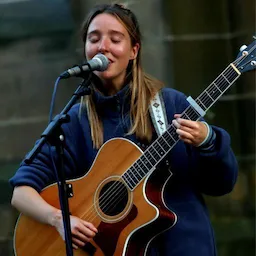
Every artist here has a free profile - and with it an Instagram Microsite, the EPK and the booking calendar in one place.












Browse UK artist profiles · GigXchange for artists · Create a free artist profile












More free tools for artists
13 more free tools and resources for gigging artists.
UK Gig Rate Calculator
Live market percentiles for every band size, city and event type — built on the GigXchange Index. Updated nightly.
Tour Poster
Your gig list becomes a live tour page in 1 click — 7 designs, ticket links on every date, and an embed for your own website.
Invoice Generator
VAT-ready invoices built from your gig bookings — auto-numbered, branded PDF, tracked from unpaid to paid.
Stage Plot
A 3D stage and 2D plan, an input list and monitor mixes that fill themselves in, a PDF rider and a live embed.
Flyer Builder
Gig flyers in eleven editorial designs — prefilled from your booking, downloaded as a JPEG or published with an embed for your own site.
Booking Manager
Your live availability embedded on your own website — visitors see free dates and book you direct. One snippet, zero upkeep.
EPK Builder
A press kit that updates itself — 18 blocks to arrange, live players, verified reviews and availability at one link.
Fans & Mailing List
An audience you own — fans join from your profile, you send branded email updates with your flyers and posters attached.
AI Matches
Pick a free date, set a 60-second brief, get ranked best-fit venues — and pitch them with real booking invites.
Booking Contract Generator
Every booking comes with its agreement: built from what you agreed, plain-English terms, signed by both sides in the app, PDF download.
Setlist Builder
Sets, intervals and running time against your slot, four looks, then a published page fans tap through, an embed and a printable gig sheet.
GX Index
The UK’s open, free rate dataset for live music. Search by city, genre and use case. Submit your own anonymous rates.
UK Musician Earnings 2026
Data-backed report on what UK musicians actually earn — the £8bn paradox, the income ladder, the 50% rule. Free, CC BY 4.0.
Frequently asked questions
What artists ask before they swap the link in their bio.
Make the link in your bio work
Sign up free, fill in your profile, and your Instagram Microsite is ready to paste.