Free tool · Set Planning
Free setlist builder for UK gigging musicians
Build the sets, intervals and encore, watch the running time against your slot, pick one of four looks - then publish a page fans tap through, embed it on your website or print the gig sheet. Built into every free GigXchange profile.
Updated 25 October 2026
01 — Try it live
LiveReal setlists, live
One saved setlist from a working UK rock-covers act, live — as the interactive page fans tap through, and as the classic sheet — publicly published on the artist’s GigXchange profile. Switch the look and watch both change.
Public on your profile, by default. Publish a setlist and it shows on your GigXchange artist page — visible to every venue, agent and promoter browsing for an act, plus fans landing from search. Both frames above are one setlist, stored in the artist’s free profile alongside their EPK, gig calendar and direct-booking inbox — and the same embed goes on your own website. Sign up free to build yours.
02 — See it
sets & intervalsSetlists Fans Can Explore
Walk the setlist builder
The real Setlist Builder in the GigXchange app - from the builder to the looks.
A setlist usually lives on the back of a beer mat or in a notes app nobody else can open. The Setlist Builder keeps the whole evening in one place - the sets, the interval, the running time - and turns it into a page people can actually see.
Below is the real thing in the GigXchange app, for The Nile Session: the builder, the evening it makes, the embed and the looks.
- 01 / 04
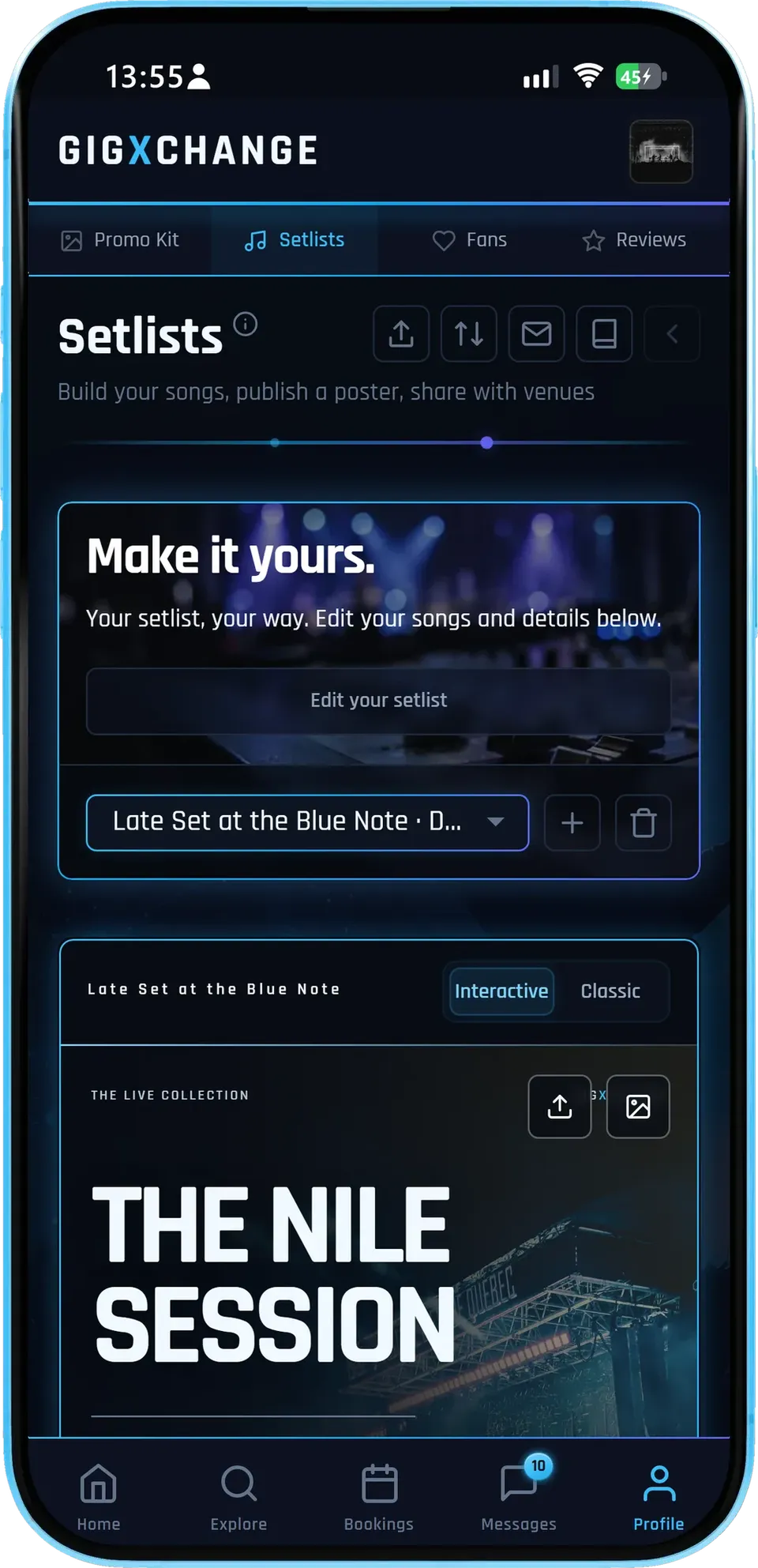
The builder
Pick a setlist, edit its songs and details, and see it in the look you chose while you work.
- Edit in placeThe setlist is the page - change a song and see it straight away.
- Interactive or ClassicSwitch between the explorable page and the designed sheet.
- Many setlistsKeep one per gig or per kind of night, and switch between them.
The bar across the top holds publish, import, email and the Song Bank, so the everyday jobs are one tap away.
- 02 / 04
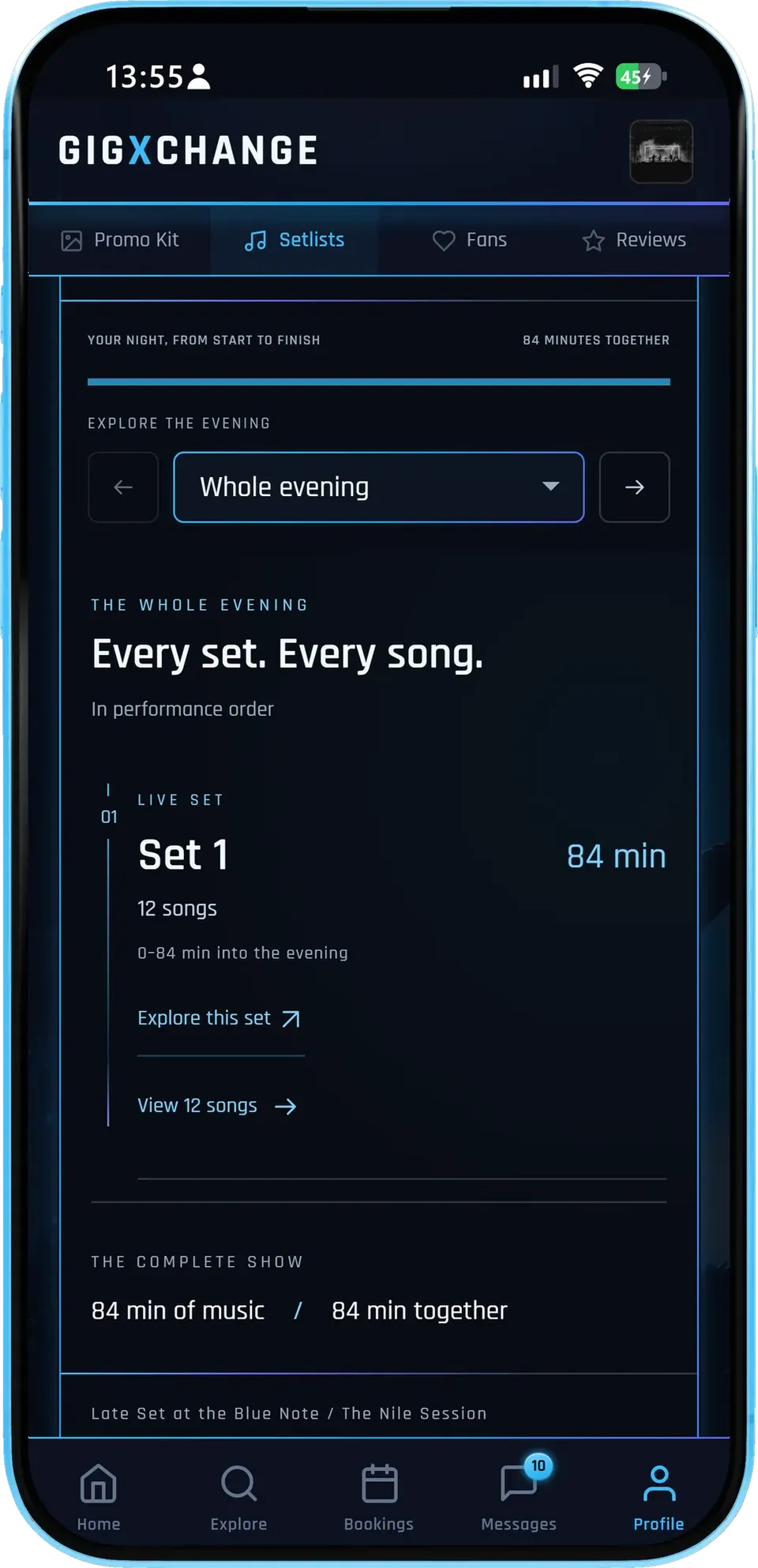
The evening
The Interactive page walks through the night in order - every set, every song, and how long it all runs.
- Explore the eveningStep through the night a set at a time, or see it whole.
- Running timeMinutes of music and minutes of the whole evening, side by side.
- Every songOpen a set to see its songs in performance order.
It is the same page the published link opens for a fan or a booker - not a summary of it.
- 03 / 04
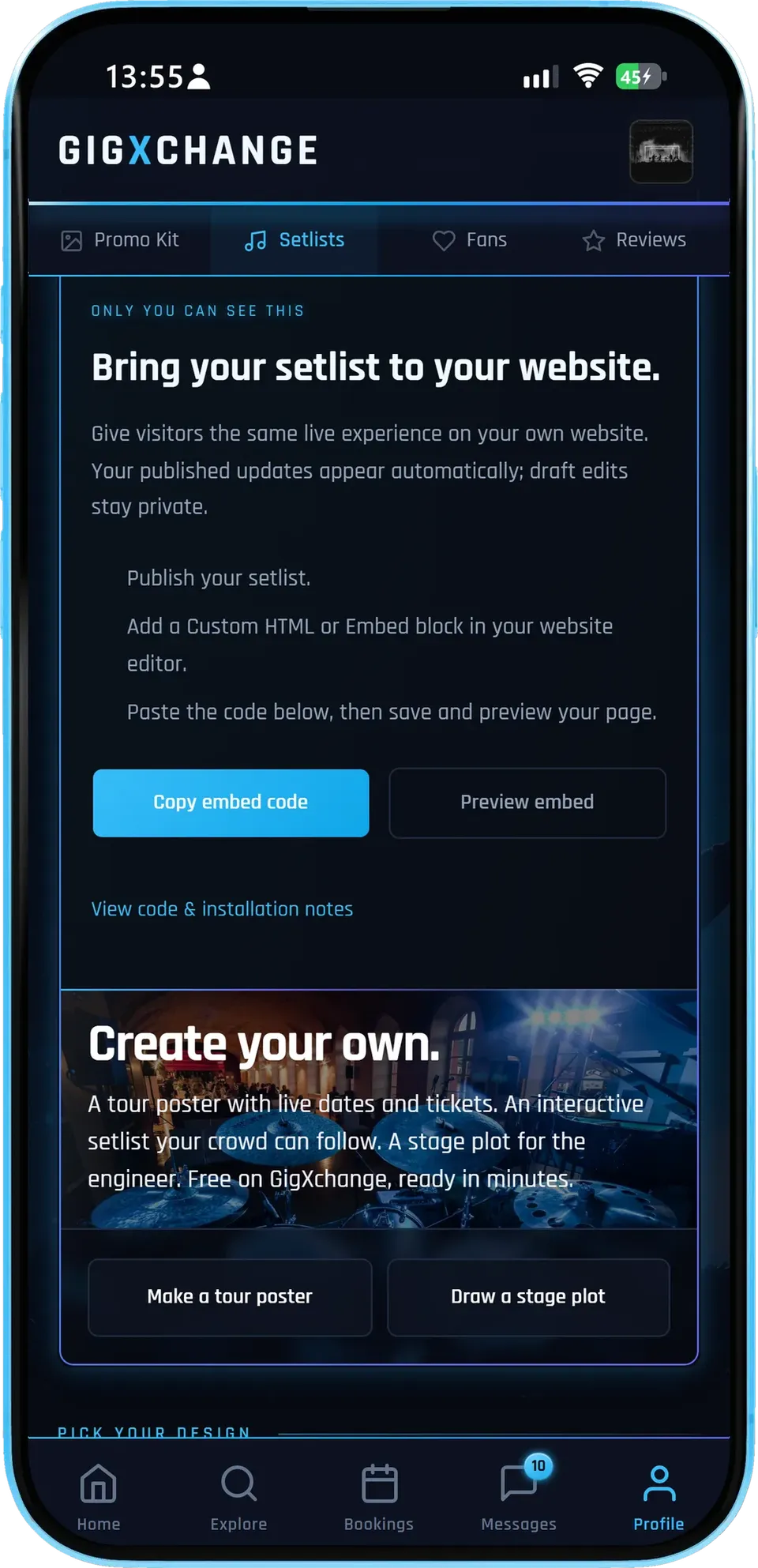
The embed
Copy the embed code into your own website and visitors get the same live setlist - published updates appear on their own.
- Copy and pasteOne block of code for any site builder that takes an embed.
- Stays currentRepublish and the embed shows the new version.
- Drafts stay privateEdits you have not published never reach your site.
Below it, the next doors: the tour poster and the stage plot, built from the same profile.
- 04 / 04
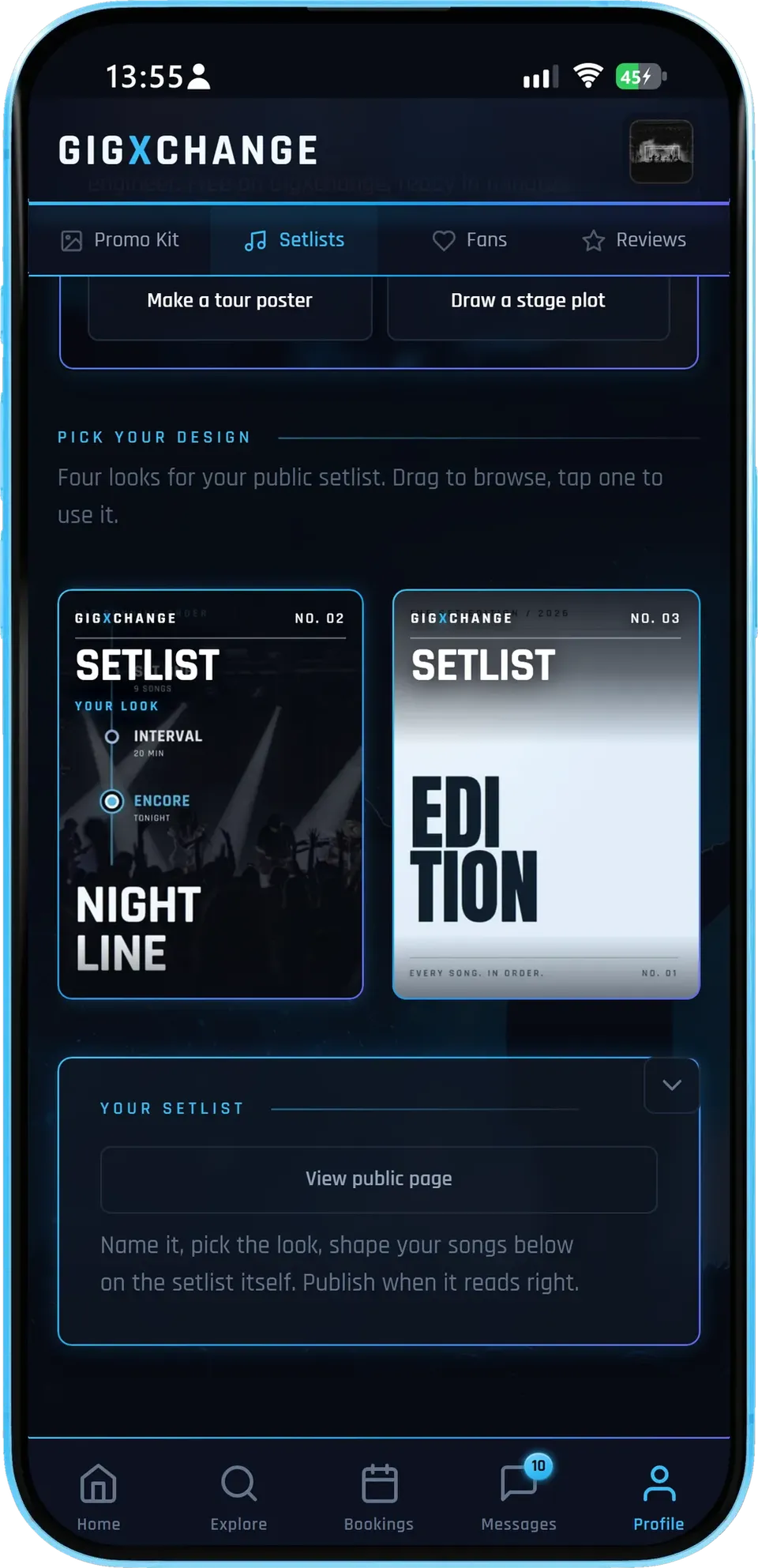
The looks
Drag through the four looks and tap one to use it - the page, the poster and the embed all change together.
- Four looksMarquee, Nightline, Edition and Signal.
- Your photoEach setlist carries its own photo and avatar.
- Your public pageOpen the page exactly as visitors will see it.
Changing the look never touches the songs, so you can try each one on the real set before you publish.
- 01 / 04
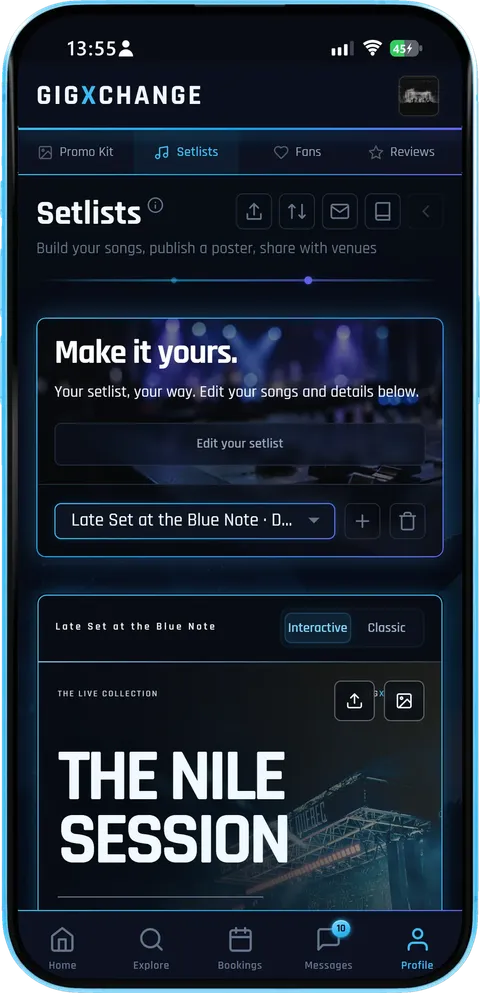
The builder
Pick a setlist, edit its songs and details, and see it in the look you chose while you work.
- Edit in placeThe setlist is the page - change a song and see it straight away.
- Interactive or ClassicSwitch between the explorable page and the designed sheet.
- Many setlistsKeep one per gig or per kind of night, and switch between them.
The bar across the top holds publish, import, email and the Song Bank, so the everyday jobs are one tap away.
- 02 / 04
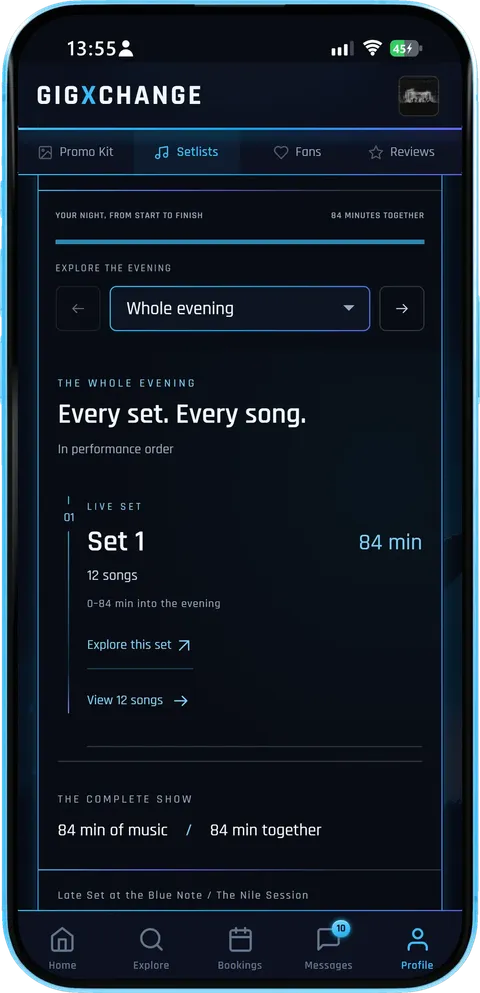
The evening
The Interactive page walks through the night in order - every set, every song, and how long it all runs.
- Explore the eveningStep through the night a set at a time, or see it whole.
- Running timeMinutes of music and minutes of the whole evening, side by side.
- Every songOpen a set to see its songs in performance order.
It is the same page the published link opens for a fan or a booker - not a summary of it.
- 03 / 04
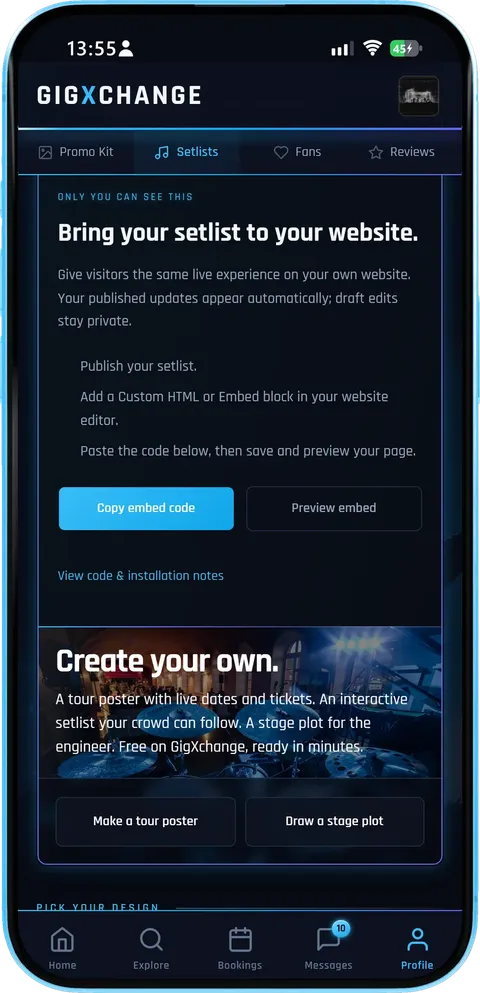
The embed
Copy the embed code into your own website and visitors get the same live setlist - published updates appear on their own.
- Copy and pasteOne block of code for any site builder that takes an embed.
- Stays currentRepublish and the embed shows the new version.
- Drafts stay privateEdits you have not published never reach your site.
Below it, the next doors: the tour poster and the stage plot, built from the same profile.
- 04 / 04
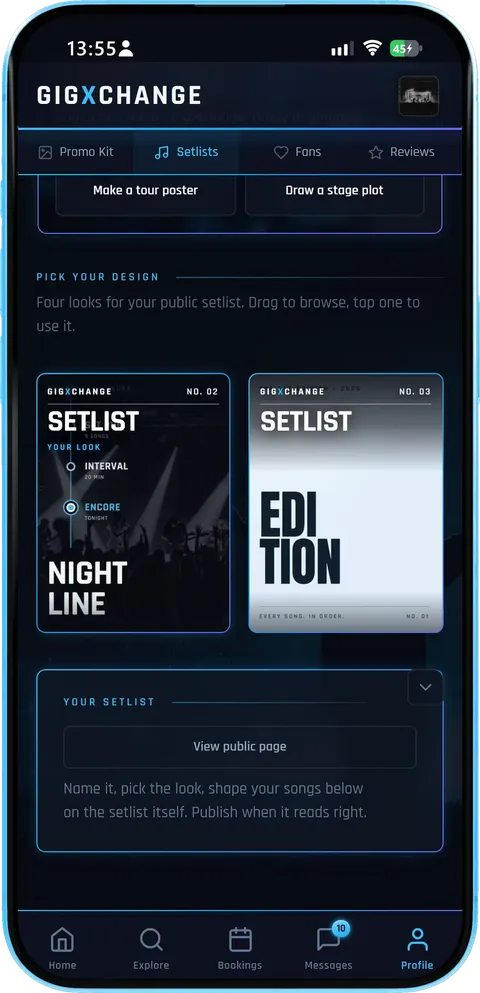
The looks
Drag through the four looks and tap one to use it - the page, the poster and the embed all change together.
- Four looksMarquee, Nightline, Edition and Signal.
- Your photoEach setlist carries its own photo and avatar.
- Your public pageOpen the page exactly as visitors will see it.
Changing the look never touches the songs, so you can try each one on the real set before you publish.
From blank page to published
Four steps, no design skill needed.
| 01 | OnboardingSign up free30 seconds, no card. The setlist builder lives in your free profile dashboard alongside your EPK and gig calendar. |
| 02 | SongsAdd your songsType them in, pick them from your Song Bank or import a spreadsheet. Title, original artist and length - the running total updates as you go. |
| 03 | ShapeShape the eveningDrag the songs into order, split them into sets with intervals and an encore, and watch the slot gauge. Then pick one of four looks. |
| 04 | SharePublish, embed or printPublish a page fans tap through, paste the embed on your website, download the poster as a PNG or print the gig sheet for the stage. |
Everything in the setlist builder
From a 30-minute open-mic slot to a two-set wedding - one tool, every kind of night.
| EveningSets, intervals, encoreSplit the night into sets, put the interval where it falls, add an encore and a show start time - the whole evening, in order. |
| TimingA gauge for your slotSet the slot you were booked for and the gauge shows how many minutes over or under you are, as you add and move songs. |
| Song BankYour whole repertoireEvery song you import, or add to the bank, is kept with its key, BPM, notes and tags. Search it, sort it, and build the next setlist from it. |
| ImportBring your old listPaste or upload a spreadsheet and the builder previews the songs before they go in - no retyping a repertoire you already wrote down. |
| LooksFour designed looksMarquee, Nightline, Edition and Signal, with your own photo and avatar. The page, the poster and the embed all wear the look you pick. |
| InteractiveA page fans explorePublish Interactive and fans tap through the evening set by set; Classic shows the designed sheet. Visitors can switch between the two. |
| PublishA page, a link, an embedPublished public setlists get their own page on your profile, a link anyone can open and an embed for your own website. |
| FeedbackHear what landsOn an Interactive setlist, fans can rate the evening and mark the songs they love. The summary is private to your band. |
The eveningSets
Sets, intervals and an encore. Shape the whole night, not just a list of songs - the builder adds it up as you go
Title, original artist and length per song
Split into sets with intervals between them
An encore and an optional show start time
Drag songs into order until the flow is right
Music time and whole-evening time, live
A slot gauge: minutes over or under your booking
| See real setlists | |
| How it works | |
| Find out more | |
| Create free account |
Looks4
Marquee, Nightline, Edition, Signal. Pick a look and the public page, the poster and the embed all wear it
Four designed looks
Your own photo and avatar on the setlist
Interactive: a page fans tap through
Classic: the designed sheet
Download the poster as a PNG
Print a gig sheet for the stage
| See the looks live | |
| How it works | |
| Find out more | |
| Create free account |
Song Bank∞
Every song you play, kept. Every song you import, or add to the bank, is kept - so the next setlist starts from songs you already have
Key, BPM, notes and tags per song
Search and sort your whole repertoire
Build a new setlist from the bank
Import a list from a spreadsheet
Unlimited setlists in every free profile
| How it works | |
| Browse artist profiles | |
| Find out more | |
| Create free account |
PublishLive
A page, a link and an embed. Publish and the setlist gets its own page on your profile - anyone can open the link, no sign-up
Its own public page and link
An embed for your own website
Shows on your artist profile when public
Edits stay private until you republish
Fans can rate it and mark favourite songs
The feedback summary is private to your band
| See real setlists | |
| Setlists that get you rebooked | |
| Find out more | |
| Create free account |
Get startedFree
Built into every free profile. The setlist builder lives in your free dashboard, next to your EPK and gig calendar
Sign up in about 30 seconds — no card
Unlimited setlists, posters and pages
Works alongside contracts, invoices and the EPK
Free on iPhone, Android or any browser
| How it works | |
| All free tools | |
| Find out more | |
| Create free account |
What makes a great gig setlist
The structure UK function bands, pub acts and festival openers actually use — distilled.
Open strong, never with a ballad
The first 90 seconds of your set is the only window you get to turn a half-distracted pub crowd into an audience. Lead with a familiar, mid-to-up-tempo cover at 110–130 BPM, in a comfortable key for your singer, and save the slow original or the deep cut for track 3 or 4, once the room is with you. (Looking for a pub residency? See the city-by-city venue directory for active live-music rooms near you.)
Hit the slot length
Most UK pub residencies are 2 x 45-minute sets with a 20-minute interval, festival opener slots are 25–30 minutes, and a standard wedding evening is 2 x 60-minute sets. Run over and you eat into the next act's stage time; run under and you've short-changed the booker. Set your slot in the builder and the gauge shows how many minutes over or under the set runs as you add and move songs. Pair that with the UK Gig Rate Calculator to know what your slot is worth before you confirm.
Plan the dynamic arc
- Tracks 1–3: recognisable openers, mid-tempo, instant payoff.
- Tracks 4–6: raise the energy, peak before the mid-set drop.
- Tracks 7–9: one ballad or stripped-back reset to give vocals a breather.
- Tracks 10–13: rebuild, layer the biggest crowd-pleasers.
- Closer: the most-shouted-back-at song you have. Always.
Once your arc is locked, lock in the gig itself — pitch the venue with one of the free venue outreach email templates, then negotiate the fee using percentile data from the GX Index.
Keys, BPMs and segues
Sequencing two songs in clashing keys (F# straight into Eb) drains energy, even if the audience can't say why. Keep each song's key and BPM in your Song Bank and group keys in fifths where you can. Drum-counted segues between two compatible-tempo tracks (within 8 BPM of each other) save 5–10 seconds of dead air per change — over a 90-minute set that's a full song's worth of momentum. For what UK working musicians actually earn per set, see the UK Musician Earnings 2026 report.
Print one for every position on stage
Tape a copy to the monitor wedge of every player, plus one for the sound engineer at front-of-house. Print the gig sheet straight from the builder — every set and song, in order — rather than relying on a phone: screens dim, lockscreens trigger, and a phone gaffer-taped to a wedge is how setlists get lost. Then publish the setlist on your GigXchange artist profile so every venue, agent and promoter browsing for an act sees exactly what you bring to the stage.
Artists already on GigXchange
Every act here can publish a setlist to the same free profile - so a booker can see what they play before they message.
More free tools for artists
12 more free tools and resources for gigging artists.
| RatesUK Gig Rate CalculatorLive market percentiles for every band size, city and event type — built on the GigXchange Index. Updated nightly. | |
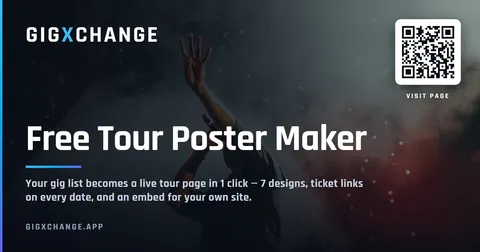
| PromotionTour PosterYour gig list becomes a live tour page in 1 click — 7 designs, ticket links on every date, and an embed for your own website. | |
| MoneyInvoice GeneratorVAT-ready invoices built from your gig bookings — auto-numbered, branded PDF, tracked from unpaid to paid. | |
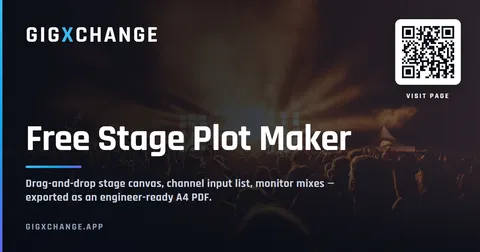
| Stage setupStage PlotA 3D stage and 2D plan, an input list and monitor mixes that fill themselves in, a PDF rider and a live embed. | |
| PromotionFlyer BuilderGig flyers in eleven editorial designs — prefilled from your booking, downloaded as a JPEG or published with an embed for your own site. | |
| BookingsBooking ManagerYour live availability embedded on your own website — visitors see free dates and book you direct. One snippet, zero upkeep. | |
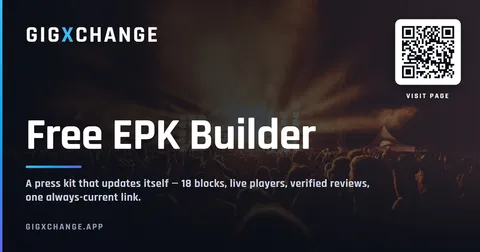
| Press kitEPK BuilderA press kit that updates itself — 18 blocks to arrange, live players, verified reviews and availability at one link. | |
| AudienceFans & Mailing ListAn audience you own — fans join from your profile, you send branded email updates with your flyers and posters attached. | |
| MatchingAI MatchesPick a free date, set a 60-second brief, get ranked best-fit venues — and pitch them with real booking invites. | |
| ContractsBooking Contract GeneratorEvery booking comes with its agreement: built from what you agreed, plain-English terms, signed by both sides in the app, PDF download. | |
| BenchmarksGX IndexThe UK’s open, free rate dataset for live music. Search by city, genre and use case. Submit your own anonymous rates. | |
| ResearchUK Musician Earnings 2026Data-backed report on what UK musicians actually earn — the £8bn paradox, the income ladder, the 50% rule. Free, CC BY 4.0. |
10 — Questions10 answersFrequently asked questions
What gigging musicians ask before they build a setlist here.
| Gig rate calculator | |
| Booking contract generator | |
| Knowledge graph | |
| All embed widgets | |
| All free tools |
| Build a free profile | |
| Browse profiles | |
| Price the gig — GX Index |
| Setlists that get you rebooked | |
| How to get more gigs |
Build your setlist free
Sign up in 30 seconds — no card, no trial limit. The setlist builder lives in your dashboard alongside your gig calendar, EPK and direct booking inbox.

Free setlist builder for UK gigging musicians
Build the sets, intervals and encore, watch the running time against your slot, pick one of four looks - then publish a page fans tap through, embed it on your website or print the gig sheet. Built into every free GigXchange profile.





Last updated: 25 October 2026
Real setlists, live
One saved setlist from a working UK rock-covers act, live — as the interactive page fans tap through, and as the classic sheet — publicly published on the artist’s GigXchange profile. Switch the look and watch both change.
Public on your profile, by default. Publish a setlist and it shows on your GigXchange artist page — visible to every venue, agent and promoter browsing for an act, plus fans landing from search. Both frames above are one setlist, stored in the artist’s free profile alongside their EPK, gig calendar and direct-booking inbox — and the same embed goes on your own website. Sign up free to build yours.
Walk the setlist builder
The real Setlist Builder in the GigXchange app - from the builder to the looks.
A setlist usually lives on the back of a beer mat or in a notes app nobody else can open. The Setlist Builder keeps the whole evening in one place - the sets, the interval, the running time - and turns it into a page people can actually see.
Below is the real thing in the GigXchange app, for The Nile Session: the builder, the evening it makes, the embed and the looks.
- 01 / 04
The builder
Pick a setlist, edit its songs and details, and see it in the look you chose while you work.
- Edit in placeThe setlist is the page - change a song and see it straight away.
- Interactive or ClassicSwitch between the explorable page and the designed sheet.
- Many setlistsKeep one per gig or per kind of night, and switch between them.
The bar across the top holds publish, import, email and the Song Bank, so the everyday jobs are one tap away.
- 02 / 04
The evening
The Interactive page walks through the night in order - every set, every song, and how long it all runs.
- Explore the eveningStep through the night a set at a time, or see it whole.
- Running timeMinutes of music and minutes of the whole evening, side by side.
- Every songOpen a set to see its songs in performance order.
It is the same page the published link opens for a fan or a booker - not a summary of it.
- 03 / 04
The embed
Copy the embed code into your own website and visitors get the same live setlist - published updates appear on their own.
- Copy and pasteOne block of code for any site builder that takes an embed.
- Stays currentRepublish and the embed shows the new version.
- Drafts stay privateEdits you have not published never reach your site.
Below it, the next doors: the tour poster and the stage plot, built from the same profile.
- 04 / 04
The looks
Drag through the four looks and tap one to use it - the page, the poster and the embed all change together.
- Four looksMarquee, Nightline, Edition and Signal.
- Your photoEach setlist carries its own photo and avatar.
- Your public pageOpen the page exactly as visitors will see it.
Changing the look never touches the songs, so you can try each one on the real set before you publish.
- 01 / 04
The builder
Pick a setlist, edit its songs and details, and see it in the look you chose while you work.
- Edit in placeThe setlist is the page - change a song and see it straight away.
- Interactive or ClassicSwitch between the explorable page and the designed sheet.
- Many setlistsKeep one per gig or per kind of night, and switch between them.
The bar across the top holds publish, import, email and the Song Bank, so the everyday jobs are one tap away.
- 02 / 04
The evening
The Interactive page walks through the night in order - every set, every song, and how long it all runs.
- Explore the eveningStep through the night a set at a time, or see it whole.
- Running timeMinutes of music and minutes of the whole evening, side by side.
- Every songOpen a set to see its songs in performance order.
It is the same page the published link opens for a fan or a booker - not a summary of it.
- 03 / 04
The embed
Copy the embed code into your own website and visitors get the same live setlist - published updates appear on their own.
- Copy and pasteOne block of code for any site builder that takes an embed.
- Stays currentRepublish and the embed shows the new version.
- Drafts stay privateEdits you have not published never reach your site.
Below it, the next doors: the tour poster and the stage plot, built from the same profile.
- 04 / 04
The looks
Drag through the four looks and tap one to use it - the page, the poster and the embed all change together.
- Four looksMarquee, Nightline, Edition and Signal.
- Your photoEach setlist carries its own photo and avatar.
- Your public pageOpen the page exactly as visitors will see it.
Changing the look never touches the songs, so you can try each one on the real set before you publish.
From blank page to published
Four steps, no design skill needed.
Sign up free
30 seconds, no card. The setlist builder lives in your free profile dashboard alongside your EPK and gig calendar.
Add your songs
Type them in, pick them from your Song Bank or import a spreadsheet. Title, original artist and length - the running total updates as you go.
Shape the evening
Drag the songs into order, split them into sets with intervals and an encore, and watch the slot gauge. Then pick one of four looks.
Publish, embed or print
Publish a page fans tap through, paste the embed on your website, download the poster as a PNG or print the gig sheet for the stage.
Everything in the setlist builder
From a 30-minute open-mic slot to a two-set wedding - one tool, every kind of night.
Sets, intervals, encore
Split the night into sets, put the interval where it falls, add an encore and a show start time - the whole evening, in order.
A gauge for your slot
Set the slot you were booked for and the gauge shows how many minutes over or under you are, as you add and move songs.
Your whole repertoire
Every song you import, or add to the bank, is kept with its key, BPM, notes and tags. Search it, sort it, and build the next setlist from it.
Bring your old list
Paste or upload a spreadsheet and the builder previews the songs before they go in - no retyping a repertoire you already wrote down.
Four designed looks
Marquee, Nightline, Edition and Signal, with your own photo and avatar. The page, the poster and the embed all wear the look you pick.
A page fans explore
Publish Interactive and fans tap through the evening set by set; Classic shows the designed sheet. Visitors can switch between the two.
A page, a link, an embed
Published public setlists get their own page on your profile, a link anyone can open and an embed for your own website.
Hear what lands
On an Interactive setlist, fans can rate the evening and mark the songs they love. The summary is private to your band.
What makes a great gig setlist
The structure UK function bands, pub acts and festival openers actually use — distilled.
Open strong, never with a ballad
The first 90 seconds of your set is the only window you get to turn a half-distracted pub crowd into an audience. Lead with a familiar, mid-to-up-tempo cover at 110–130 BPM, in a comfortable key for your singer, and save the slow original or the deep cut for track 3 or 4, once the room is with you. (Looking for a pub residency? See the city-by-city venue directory for active live-music rooms near you.)
Hit the slot length
Most UK pub residencies are 2 x 45-minute sets with a 20-minute interval, festival opener slots are 25–30 minutes, and a standard wedding evening is 2 x 60-minute sets. Run over and you eat into the next act's stage time; run under and you've short-changed the booker. Set your slot in the builder and the gauge shows how many minutes over or under the set runs as you add and move songs. Pair that with the UK Gig Rate Calculator to know what your slot is worth before you confirm.
Plan the dynamic arc
- Tracks 1–3: recognisable openers, mid-tempo, instant payoff.
- Tracks 4–6: raise the energy, peak before the mid-set drop.
- Tracks 7–9: one ballad or stripped-back reset to give vocals a breather.
- Tracks 10–13: rebuild, layer the biggest crowd-pleasers.
- Closer: the most-shouted-back-at song you have. Always.
Once your arc is locked, lock in the gig itself — pitch the venue with one of the free venue outreach email templates, then negotiate the fee using percentile data from the GX Index.
Keys, BPMs and segues
Sequencing two songs in clashing keys (F# straight into Eb) drains energy, even if the audience can't say why. Keep each song's key and BPM in your Song Bank and group keys in fifths where you can. Drum-counted segues between two compatible-tempo tracks (within 8 BPM of each other) save 5–10 seconds of dead air per change — over a 90-minute set that's a full song's worth of momentum. For what UK working musicians actually earn per set, see the UK Musician Earnings 2026 report.
Print one for every position on stage
Tape a copy to the monitor wedge of every player, plus one for the sound engineer at front-of-house. Print the gig sheet straight from the builder — every set and song, in order — rather than relying on a phone: screens dim, lockscreens trigger, and a phone gaffer-taped to a wedge is how setlists get lost. Then publish the setlist on your GigXchange artist profile so every venue, agent and promoter browsing for an act sees exactly what you bring to the stage.
Artists already on GigXchange
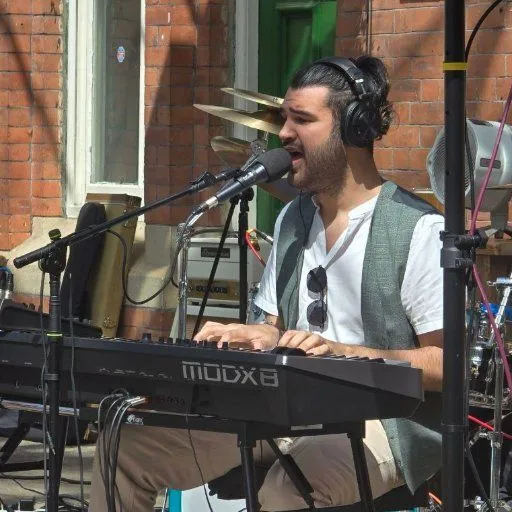
Every act here can publish a setlist to the same free profile - so a booker can see what they play before they message.



















Browse UK artist profiles · GigXchange for artists · Create a free artist profile














More free tools for artists
12 more free tools and resources for gigging artists.
UK Gig Rate Calculator
Live market percentiles for every band size, city and event type — built on the GigXchange Index. Updated nightly.
Tour Poster
Your gig list becomes a live tour page in 1 click — 7 designs, ticket links on every date, and an embed for your own website.
Invoice Generator
VAT-ready invoices built from your gig bookings — auto-numbered, branded PDF, tracked from unpaid to paid.
Stage Plot
A 3D stage and 2D plan, an input list and monitor mixes that fill themselves in, a PDF rider and a live embed.
Flyer Builder
Gig flyers in eleven editorial designs — prefilled from your booking, downloaded as a JPEG or published with an embed for your own site.
Booking Manager
Your live availability embedded on your own website — visitors see free dates and book you direct. One snippet, zero upkeep.
EPK Builder
A press kit that updates itself — 18 blocks to arrange, live players, verified reviews and availability at one link.
Fans & Mailing List
An audience you own — fans join from your profile, you send branded email updates with your flyers and posters attached.
AI Matches
Pick a free date, set a 60-second brief, get ranked best-fit venues — and pitch them with real booking invites.
Booking Contract Generator
Every booking comes with its agreement: built from what you agreed, plain-English terms, signed by both sides in the app, PDF download.
GX Index
The UK’s open, free rate dataset for live music. Search by city, genre and use case. Submit your own anonymous rates.
UK Musician Earnings 2026
Data-backed report on what UK musicians actually earn — the £8bn paradox, the income ladder, the 50% rule. Free, CC BY 4.0.
Frequently asked questions
What gigging musicians ask before they build a setlist here.
Build your setlist free
Sign up in 30 seconds — no card, no trial limit. The setlist builder lives in your dashboard alongside your gig calendar, EPK and direct booking inbox.